

4.1.5 מעקב המרות
הערך וההשפעה על העסק
כדי לספק ביעילות את יכולות הלמידה החישובית והניתוח המתקדמות של האקוסיסטם של Google לקמפיינים פרסומיים של לקוחות מוכרים, צריך להטמיע תגים של מעקב המרות ורימרקטינג באתרים של הלקוחות.
המרה ב-Google Ads מתרחשת כשמשתמש מבצע פעולה מסוימת אחרי לחיצה על מודעה, כמו רכישת מוצר, התקנת אפליקציה לנייד או הרשמה לרשימת כתובות אימייל. מעקב המרות מספק תובנות חשובות לגבי פעולות המשתמשים אחרי צפייה במודעה או לחיצה עליה, כולל מידע לחישוב החזר ה-ROI והשוואה בין ערכים שונים של החזר ה-ROI. כך הלקוחות יכולים להחליט איפה כדאי להם להשקיע את תקציב הפרסום. מעקב עוזר גם לוודא שהנתונים זמינים למטרות השוואה. ההזמנות משתנות בהתאם למוצר או לקטגוריה, ולכן מעקב המרות יכול להיות שימושי גם כדי להראות איך קבוצות ספציפיות של כרטיסי מוצר מניבות מכירות.
יעד המרה הוא קבוצה של פעולות המרה עם אותו יעד בסיסי. לדוגמה, 'רכישה' יכול להיות יעד המרה שכולל את פעולות ההמרה 'רכישות באתר' ו 'מכירות בחנות הפיזית'.
פעולות ההמרה עדיין משמשות למעקב אחר המרות ולאופטימיזציה של הקמפיין. אתם יוצרים פעולות המרה ו-Google מקבצת אותן ליעדי המרה.
פעולת המרה מסוג רכישה
הטמעה של מעקב ההמרות שמתואר כאן מאפשרת לחשבון Google Ads של המוֹכר למדוד את מספר ההמרות מסוג רכישה ואת הערך של ההמרות האלה. בלי מעקב המרות, לא תוכלו למדוד את הערך העסקי שהקמפיין מניב במונחים של החזר על הוצאות הפרסום (ROAS). היא גם שולחת אותות נתונים נוספים שמאפשרים לבצע אופטימיזציה של הביצועים ברמת הקמפיין.
פעולות המרה אחרות
פעולת ההמרה מסוג רכישה היא חובה, אבל מעקב אחרי פעולות המרה נוספות יכול לספק למוֹכרים תובנות נוספות. מומלץ לתעד כל מה שאפשר, תוך הטמעה של כמה שיותר פעולות המרה מרכזיות. רשימה מלאה של פעולות ההמרה המומלצות מפורטת בקטע 'הנחיות טכניות ל-API'.
באופן כללי, ההמלצה היא לכלול את הנתונים הבאים:
- כל אירוע הצלחה שמשויך ישירות לערך
- אירועי הצלחה שתורמים להמרות מרכזיות כמו add_to_cart ו-sign_up.
- אינטראקציות ראשוניות ואינטראקציות של משתמשים שעוזרות למפרסמים להבין איך הם יוצרים מעורבות אצל משתמשי הקצה שלהם
פעולות המרה משניות משמשות רק לצורכי תיעוד ודיווח, ולא משפיעות על הצעות המחיר. מידע נוסף על פעולות המרה ראשיות ומשניות
הנחיות לגבי UX
כדי למזער את הסיכון לשגיאות, מומלץ להטמיע את מעקב ההמרות באופן פרוגרמטי ללא התערבות של המוכר, אבל חשוב לוודא שהמוכרים יודעים שהגדרתם מעקב המרות.
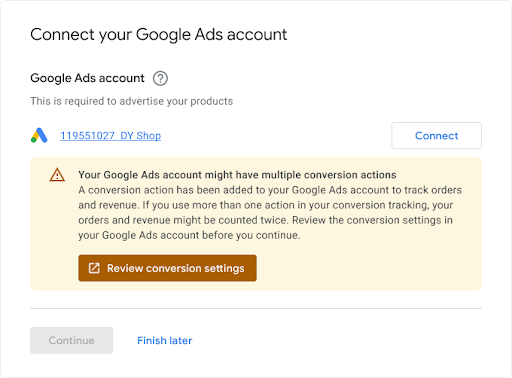
כשמוֹכרים מקשרים חשבון קיים ב-Google Ads, מומלץ להציג להם הודעה שלפיה יכול להיות שבחשבון שלהם כבר מוגדר מעקב המרות, כי יכול להיות שיהיו התנגשויות שצריך לפתור. דוגמה מוצגת בהמשך.
הנחיות טכניות
כך פועל מעקב ההמרות. בקטע הזה מפורט כל שלב:
אתם יוצרים ConversionAction בחשבון Google Ads של המוכר כדי לעקוב אחרי רכישות (ואופציונלית אחרי פעולות אחרות של לקוחות) שמתבצעות באתר שלו.
מוסיפים את התג או את קטע הקוד של פעולת ההמרה לאתר או לאפליקציה לנייד. פרטים נוספים זמינים במאמר הגדרת מעקב המרות באתר.
כשלקוח לוחץ על המודעה, קובץ Cookie זמני מוצב במחשב או במכשיר הנייד של הלקוח.
כשהלקוח משלים את הפעולה שהוגדרה למפרסם, Google מזהה את קובץ ה-Cookie (באמצעות קטע הקוד שנוסף) ומתעדת המרה יחד עם פרמטרים אחרים, כמו 'ערך', אם רלוונטי.
דרישות מוקדמות
לפני שמתחילים, חשוב לוודא שיש לכם מזהה מפתח של Google Tag. אם אין לכם מזהה מפתח של Google Tag, אתם יכולים למלא את טופס הבקשה למזהה מפתח של Google Tag. מזהה המפתח שונה ממזהים אחרים, כמו מזהה המדידה או מזהה ההמרה, שמשתמשי הקצה מוסיפים לקוד המדידה של האתר שלהם.
יצירה והגדרה של פעולות המרה
בדוגמאות הבאות אפשר לראות איך ליצור פעולת המרה ולהוסיף אותה לחשבון Google Ads. כל דוגמה מטפלת בכל משימות האימות ברקע בשבילכם, ומסבירה איך ליצור פעולת המרה:
Java
// Copyright 2018 Google LLC // // Licensed under the Apache License, Version 2.0 (the "License"); // you may not use this file except in compliance with the License. // You may obtain a copy of the License at // // https://www.apache.org/licenses/LICENSE-2.0 // // Unless required by applicable law or agreed to in writing, software // distributed under the License is distributed on an "AS IS" BASIS, // WITHOUT WARRANTIES OR CONDITIONS OF ANY KIND, either express or implied. // See the License for the specific language governing permissions and // limitations under the License. package com.google.ads.googleads.examples.remarketing; import static com.google.ads.googleads.examples.utils.CodeSampleHelper.getPrintableDateTime; import com.beust.jcommander.Parameter; import com.google.ads.googleads.examples.utils.ArgumentNames; import com.google.ads.googleads.examples.utils.CodeSampleParams; import com.google.ads.googleads.lib.GoogleAdsClient; import com.google.ads.googleads.v25.enums.ConversionActionCategoryEnum.ConversionActionCategory; import com.google.ads.googleads.v25.enums.ConversionActionStatusEnum.ConversionActionStatus; import com.google.ads.googleads.v25.enums.ConversionActionTypeEnum.ConversionActionType; import com.google.ads.googleads.v25.errors.GoogleAdsError; import com.google.ads.googleads.v25.errors.GoogleAdsException; import com.google.ads.googleads.v25.resources.ConversionAction; import com.google.ads.googleads.v25.resources.ConversionAction.ValueSettings; import com.google.ads.googleads.v25.services.ConversionActionOperation; import com.google.ads.googleads.v25.services.ConversionActionServiceClient; import com.google.ads.googleads.v25.services.MutateConversionActionResult; import com.google.ads.googleads.v25.services.MutateConversionActionsResponse; import java.io.FileNotFoundException; import java.io.IOException; import java.util.Collections; /** Adds a conversion action. */ public class AddConversionAction { private static class AddConversionActionParams extends CodeSampleParams { @Parameter(names = ArgumentNames.CUSTOMER_ID, required = true) private Long customerId; } public static void main(String[] args) { AddConversionActionParams params = new AddConversionActionParams(); if (!params.parseArguments(args)) { // Either pass the required parameters for this example on the command line, or insert them // into the code here. See the parameter class definition above for descriptions. params.customerId = Long.parseLong("INSERT_CUSTOMER_ID_HERE"); } GoogleAdsClient googleAdsClient = null; try { googleAdsClient = GoogleAdsClient.newBuilder().fromPropertiesFile().build(); } catch (FileNotFoundException fnfe) { System.err.printf( "Failed to load GoogleAdsClient configuration from file. Exception: %s%n", fnfe); System.exit(1); } catch (IOException ioe) { System.err.printf("Failed to create GoogleAdsClient. Exception: %s%n", ioe); System.exit(1); } try { new AddConversionAction().runExample(googleAdsClient, params.customerId); } catch (GoogleAdsException gae) { // GoogleAdsException is the base class for most exceptions thrown by an API request. // Instances of this exception have a message and a GoogleAdsFailure that contains a // collection of GoogleAdsErrors that indicate the underlying causes of the // GoogleAdsException. System.err.printf( "Request ID %s failed due to GoogleAdsException. Underlying errors:%n", gae.getRequestId()); int i = 0; for (GoogleAdsError googleAdsError : gae.getGoogleAdsFailure().getErrorsList()) { System.err.printf(" Error %d: %s%n", i++, googleAdsError); } System.exit(1); } } /** * Runs the example. * * @param googleAdsClient the Google Ads API client. * @param customerId the client customer ID. * @throws GoogleAdsException if an API request failed with one or more service errors. */ private void runExample(GoogleAdsClient googleAdsClient, long customerId) { // Creates a ConversionAction. ConversionAction conversionAction = ConversionAction.newBuilder() // Note that conversion action names must be unique. If a conversion action already // exists with the specified conversion_action_name the create operation will fail with // a ConversionActionError.DUPLICATE_NAME error. .setName("Earth to Mars Cruises Conversion #" + getPrintableDateTime()) .setCategory(ConversionActionCategory.DEFAULT) .setType(ConversionActionType.WEBPAGE) .setStatus(ConversionActionStatus.ENABLED) .setViewThroughLookbackWindowDays(15L) .setValueSettings( ValueSettings.newBuilder() .setDefaultValue(23.41) .setAlwaysUseDefaultValue(true) .build()) .build(); // Creates the operation. ConversionActionOperation operation = ConversionActionOperation.newBuilder().setCreate(conversionAction).build(); try (ConversionActionServiceClient conversionActionServiceClient = googleAdsClient.getLatestVersion().createConversionActionServiceClient()) { MutateConversionActionsResponse response = conversionActionServiceClient.mutateConversionActions( Long.toString(customerId), Collections.singletonList(operation)); System.out.printf("Added %d conversion actions:%n", response.getResultsCount()); for (MutateConversionActionResult result : response.getResultsList()) { System.out.printf( "New conversion action added with resource name: '%s'%n", result.getResourceName()); } } } }
C#
// Copyright 2019 Google LLC // // Licensed under the Apache License, Version 2.0 (the "License"); // you may not use this file except in compliance with the License. // You may obtain a copy of the License at // // http://www.apache.org/licenses/LICENSE-2.0 // // Unless required by applicable law or agreed to in writing, software // distributed under the License is distributed on an "AS IS" BASIS, // WITHOUT WARRANTIES OR CONDITIONS OF ANY KIND, either express or implied. // See the License for the specific language governing permissions and // limitations under the License. using CommandLine; using Google.Ads.Gax.Examples; using Google.Ads.GoogleAds.Lib; using Google.Ads.GoogleAds.V25.Errors; using Google.Ads.GoogleAds.V25.Resources; using Google.Ads.GoogleAds.V25.Services; using System; using static Google.Ads.GoogleAds.V25.Enums.ConversionActionCategoryEnum.Types; using static Google.Ads.GoogleAds.V25.Enums.ConversionActionStatusEnum.Types; using static Google.Ads.GoogleAds.V25.Enums.ConversionActionTypeEnum.Types; namespace Google.Ads.GoogleAds.Examples.V25 { /// <summary> /// This code example illustrates adding a conversion action. /// </summary> public class AddConversionAction : ExampleBase { /// <summary> /// Command line options for running the <see cref="AddConversionAction"/> example. /// </summary> public class Options : OptionsBase { /// <summary> /// The Google Ads customer ID for which the conversion action is added. /// </summary> [Option("customerId", Required = true, HelpText = "The Google Ads customer ID for which the conversion action is added.")] public long CustomerId { get; set; } } /// <summary> /// Main method, to run this code example as a standalone application. /// </summary> /// <param name="args">The command line arguments.</param> public static void Main(string[] args) { Options options = ExampleUtilities.ParseCommandLine<Options>(args); AddConversionAction codeExample = new AddConversionAction(); Console.WriteLine(codeExample.Description); codeExample.Run(new GoogleAdsClient(), options.CustomerId); } /// <summary> /// Returns a description about the code example. /// </summary> public override string Description => "This code example illustrates adding a conversion action."; /// <summary> /// Runs the code example. /// </summary> /// <param name="client">The Google Ads client.</param> /// <param name="customerId">The Google Ads customer ID for which the conversion action is /// added.</param> public void Run(GoogleAdsClient client, long customerId) { // Get the ConversionActionService. ConversionActionServiceClient conversionActionService = client.GetService(Services.V25.ConversionActionService); // Note that conversion action names must be unique. // If a conversion action already exists with the specified name the create operation // will fail with a ConversionAction.DUPLICATE_NAME error. string ConversionActionName = "Earth to Mars Cruises Conversion #" + ExampleUtilities.GetRandomString(); // Add a conversion action. ConversionAction conversionAction = new ConversionAction() { Name = ConversionActionName, Category = ConversionActionCategory.Default, Type = ConversionActionType.Webpage, Status = ConversionActionStatus.Enabled, ViewThroughLookbackWindowDays = 15, ValueSettings = new ConversionAction.Types.ValueSettings() { DefaultValue = 23.41, AlwaysUseDefaultValue = true } }; // Create the operation. ConversionActionOperation operation = new ConversionActionOperation() { Create = conversionAction }; try { // Create the conversion action. MutateConversionActionsResponse response = conversionActionService.MutateConversionActions(customerId.ToString(), new ConversionActionOperation[] { operation }); // Display the results. foreach (MutateConversionActionResult newConversionAction in response.Results) { Console.WriteLine($"New conversion action with resource name = " + $"'{newConversionAction.ResourceName}' was added."); } } catch (GoogleAdsException e) { Console.WriteLine("Failure:"); Console.WriteLine($"Message: {e.Message}"); Console.WriteLine($"Failure: {e.Failure}"); Console.WriteLine($"Request ID: {e.RequestId}"); throw; } } } }
PHP
<?php /** * Copyright 2018 Google LLC * * Licensed under the Apache License, Version 2.0 (the "License"); * you may not use this file except in compliance with the License. * You may obtain a copy of the License at * * https://www.apache.org/licenses/LICENSE-2.0 * * Unless required by applicable law or agreed to in writing, software * distributed under the License is distributed on an "AS IS" BASIS, * WITHOUT WARRANTIES OR CONDITIONS OF ANY KIND, either express or implied. * See the License for the specific language governing permissions and * limitations under the License. */ namespace Google\Ads\GoogleAds\Examples\Remarketing; require __DIR__ . '/../../vendor/autoload.php'; use GetOpt\GetOpt; use Google\Ads\GoogleAds\Examples\Utils\ArgumentNames; use Google\Ads\GoogleAds\Examples\Utils\ArgumentParser; use Google\Ads\GoogleAds\Examples\Utils\Helper; use Google\Ads\GoogleAds\Lib\V25\GoogleAdsClient; use Google\Ads\GoogleAds\Lib\V25\GoogleAdsClientBuilder; use Google\Ads\GoogleAds\Lib\V25\GoogleAdsException; use Google\Ads\GoogleAds\Lib\OAuth2TokenBuilder; use Google\Ads\GoogleAds\V25\Enums\ConversionActionCategoryEnum\ConversionActionCategory; use Google\Ads\GoogleAds\V25\Enums\ConversionActionStatusEnum\ConversionActionStatus; use Google\Ads\GoogleAds\V25\Enums\ConversionActionTypeEnum\ConversionActionType; use Google\Ads\GoogleAds\V25\Errors\GoogleAdsError; use Google\Ads\GoogleAds\V25\Resources\ConversionAction; use Google\Ads\GoogleAds\V25\Resources\ConversionAction\ValueSettings; use Google\Ads\GoogleAds\V25\Services\ConversionActionOperation; use Google\Ads\GoogleAds\V25\Services\MutateConversionActionsRequest; use Google\ApiCore\ApiException; /** * This example illustrates adding a conversion action. */ class AddConversionAction { private const CUSTOMER_ID = 'INSERT_CUSTOMER_ID_HERE'; public static function main() { // Either pass the required parameters for this example on the command line, or insert them // into the constants above. $options = (new ArgumentParser())->parseCommandArguments( [ ArgumentNames::CUSTOMER_ID => GetOpt::REQUIRED_ARGUMENT ] ); // Generate a refreshable OAuth2 credential for authentication. $oAuth2Credential = (new OAuth2TokenBuilder())->fromFile()->build(); // Construct a Google Ads client configured from a properties file and the // OAuth2 credentials above. $googleAdsClient = (new GoogleAdsClientBuilder()) ->fromFile() ->withOAuth2Credential($oAuth2Credential) ->build(); try { self::runExample( $googleAdsClient, $options[ArgumentNames::CUSTOMER_ID] ?: self::CUSTOMER_ID ); } catch (GoogleAdsException $googleAdsException) { printf( "Request with ID '%s' has failed.%sGoogle Ads failure details:%s", $googleAdsException->getRequestId(), PHP_EOL, PHP_EOL ); foreach ($googleAdsException->getGoogleAdsFailure()->getErrors() as $error) { /** * @var GoogleAdsError $error */ printf( "\t%s: %s%s", $error->getErrorCode()->getErrorCode(), $error->getMessage(), PHP_EOL ); } exit(1); } catch (ApiException $apiException) { printf( "ApiException was thrown with message '%s'.%s", $apiException->getMessage(), PHP_EOL ); exit(1); } } /** * Runs the example. * * @param GoogleAdsClient $googleAdsClient the Google Ads API client * @param int $customerId the customer ID */ public static function runExample(GoogleAdsClient $googleAdsClient, int $customerId) { // Creates a conversion action. $conversionAction = new ConversionAction( [ // Note that conversion action names must be unique. // If a conversion action already exists with the specified conversion_action_name // the create operation will fail with a ConversionActionError.DUPLICATE_NAME error. 'name' => 'Earth to Mars Cruises Conversion #' . Helper::getPrintableDatetime(), 'category' => ConversionActionCategory::PBDEFAULT, 'type' => ConversionActionType::WEBPAGE, 'status' => ConversionActionStatus::ENABLED, 'view_through_lookback_window_days' => 15, 'value_settings' => new ValueSettings( [ 'default_value' => 23.41, 'always_use_default_value' => true ] ) ] ); // Creates a conversion action operation. $conversionActionOperation = new ConversionActionOperation(); $conversionActionOperation->setCreate($conversionAction); // Issues a mutate request to add the conversion action. $conversionActionServiceClient = $googleAdsClient->getConversionActionServiceClient(); $response = $conversionActionServiceClient->mutateConversionActions( MutateConversionActionsRequest::build($customerId, [$conversionActionOperation]) ); printf("Added %d conversion actions:%s", $response->getResults()->count(), PHP_EOL); foreach ($response->getResults() as $addedConversionAction) { /** * @var ConversionAction $addedConversionAction */ printf( "New conversion action added with resource name: '%s'%s", $addedConversionAction->getResourceName(), PHP_EOL ); } } } AddConversionAction::main();
Python
#!/usr/bin/env python # Copyright 2018 Google LLC # # Licensed under the Apache License, Version 2.0 (the "License"); # you may not use this file except in compliance with the License. # You may obtain a copy of the License at # # https://www.apache.org/licenses/LICENSE-2.0 # # Unless required by applicable law or agreed to in writing, software # distributed under the License is distributed on an "AS IS" BASIS, # WITHOUT WARRANTIES OR CONDITIONS OF ANY KIND, either express or implied. # See the License for the specific language governing permissions and # limitations under the License. """This example illustrates adding a conversion action.""" import argparse import sys import uuid from google.ads.googleads.client import GoogleAdsClient from google.ads.googleads.errors import GoogleAdsException from google.ads.googleads.v24.resources.types.conversion_action import ( ConversionAction, ) from google.ads.googleads.v24.services.services.conversion_action_service import ( ConversionActionServiceClient, ) from google.ads.googleads.v24.services.types.conversion_action_service import ( ConversionActionOperation, MutateConversionActionsResponse, ) def main(client: GoogleAdsClient, customer_id: str) -> None: conversion_action_service: ConversionActionServiceClient = ( client.get_service("ConversionActionService") ) # Create the operation. conversion_action_operation: ConversionActionOperation = client.get_type( "ConversionActionOperation" ) # Create conversion action. conversion_action: ConversionAction = conversion_action_operation.create # Note that conversion action names must be unique. If a conversion action # already exists with the specified conversion_action_name, the create # operation will fail with a ConversionActionError.DUPLICATE_NAME error. conversion_action.name = f"Earth to Mars Cruises Conversion {uuid.uuid4()}" conversion_action.type_ = ( client.enums.ConversionActionTypeEnum.UPLOAD_CLICKS ) conversion_action.category = ( client.enums.ConversionActionCategoryEnum.DEFAULT ) conversion_action.status = client.enums.ConversionActionStatusEnum.ENABLED conversion_action.view_through_lookback_window_days = 15 # Create a value settings object. value_settings: ConversionAction.ValueSettings = ( conversion_action.value_settings ) value_settings.default_value = 15.0 value_settings.always_use_default_value = True # Add the conversion action. conversion_action_response: MutateConversionActionsResponse = ( conversion_action_service.mutate_conversion_actions( customer_id=customer_id, operations=[conversion_action_operation], ) ) print( "Created conversion action " f'"{conversion_action_response.results[0].resource_name}".' ) if __name__ == "__main__": parser: argparse.ArgumentParser = argparse.ArgumentParser( description="Adds a conversion action for specified customer." ) # The following argument(s) should be provided to run the example. parser.add_argument( "-c", "--customer_id", type=str, required=True, help="The Google Ads customer ID.", ) args: argparse.Namespace = parser.parse_args() # GoogleAdsClient will read the google-ads.yaml configuration file in the # home directory if none is specified. googleads_client: GoogleAdsClient = GoogleAdsClient.load_from_storage( version="v24" ) try: main(googleads_client, args.customer_id) except GoogleAdsException as ex: print( f'Request with ID "{ex.request_id}" failed with status ' f'"{ex.error.code().name}" and includes the following errors:' ) for error in ex.failure.errors: print(f'\tError with message "{error.message}".') if error.location: for field_path_element in error.location.field_path_elements: print(f"\t\tOn field: {field_path_element.field_name}") sys.exit(1)
Ruby
#!/usr/bin/env ruby # Encoding: utf-8 # # Copyright 2018 Google LLC # # Licensed under the Apache License, Version 2.0 (the "License"); # you may not use this file except in compliance with the License. # You may obtain a copy of the License at # # https://www.apache.org/licenses/LICENSE-2.0 # # Unless required by applicable law or agreed to in writing, software # distributed under the License is distributed on an "AS IS" BASIS, # WITHOUT WARRANTIES OR CONDITIONS OF ANY KIND, either express or implied. # See the License for the specific language governing permissions and # limitations under the License. # # This code example illustrates adding a conversion action. require 'optparse' require 'google/ads/google_ads' require 'date' require_relative '../shared/error_handler.rb' def add_conversion_action(customer_id) # GoogleAdsClient will read a config file from # ENV['HOME']/google_ads_config.rb when called without parameters client = Google::Ads::GoogleAds::GoogleAdsClient.new # Add a conversion action. conversion_action = client.resource.conversion_action do |ca| ca.name = "Earth to Mars Cruises Conversion #{(Time.new.to_f * 100).to_i}" ca.type = :UPLOAD_CLICKS ca.category = :DEFAULT ca.status = :ENABLED ca.view_through_lookback_window_days = 15 # Create a value settings object. ca.value_settings = client.resource.value_settings do |vs| vs.default_value = 15 vs.always_use_default_value = true end end # Create the operation. conversion_action_operation = client.operation.create_resource.conversion_action(conversion_action) # Add the ad group ad. response = client.service.conversion_action.mutate_conversion_actions( customer_id: customer_id, operations: [conversion_action_operation], ) puts "New conversion action with resource name = #{response.results.first.resource_name}." end if __FILE__ == $0 options = {} # The following parameter(s) should be provided to run the example. You can # either specify these by changing the INSERT_XXX_ID_HERE values below, or on # the command line. # # Parameters passed on the command line will override any parameters set in # code. # # Running the example with -h will print the command line usage. options[:customer_id] = 'INSERT_CUSTOMER_ID_HERE' OptionParser.new do |opts| opts.banner = sprintf('Usage: %s [options]', File.basename(__FILE__)) opts.separator '' opts.separator 'Options:' opts.on('-C', '--customer-id CUSTOMER-ID', String, 'Customer ID') do |v| options[:customer_id] = v end opts.separator '' opts.separator 'Help:' opts.on_tail('-h', '--help', 'Show this message') do puts opts exit end end.parse! begin add_conversion_action(options.fetch(:customer_id).tr("-", "")) rescue Google::Ads::GoogleAds::Errors::GoogleAdsError => e GoogleAdsErrorHandler.handle_google_ads_error(e) raise # Re-raise the error to maintain original script behavior. end end
Perl
#!/usr/bin/perl -w # # Copyright 2019, Google LLC # # Licensed under the Apache License, Version 2.0 (the "License"); # you may not use this file except in compliance with the License. # You may obtain a copy of the License at # # http://www.apache.org/licenses/LICENSE-2.0 # # Unless required by applicable law or agreed to in writing, software # distributed under the License is distributed on an "AS IS" BASIS, # WITHOUT WARRANTIES OR CONDITIONS OF ANY KIND, either express or implied. # See the License for the specific language governing permissions and # limitations under the License. # # This example illustrates adding a conversion action. use strict; use warnings; use utf8; use FindBin qw($Bin); use lib "$Bin/../../lib"; use Google::Ads::GoogleAds::Client; use Google::Ads::GoogleAds::Utils::GoogleAdsHelper; use Google::Ads::GoogleAds::V25::Resources::ConversionAction; use Google::Ads::GoogleAds::V25::Resources::ValueSettings; use Google::Ads::GoogleAds::V25::Enums::ConversionActionCategoryEnum qw(DEFAULT); use Google::Ads::GoogleAds::V25::Enums::ConversionActionTypeEnum qw(WEBPAGE); use Google::Ads::GoogleAds::V25::Enums::ConversionActionStatusEnum qw(ENABLED); use Google::Ads::GoogleAds::V25::Services::ConversionActionService::ConversionActionOperation; use Getopt::Long qw(:config auto_help); use Pod::Usage; use Cwd qw(abs_path); use Data::Uniqid qw(uniqid); # The following parameter(s) should be provided to run the example. You can # either specify these by changing the INSERT_XXX_ID_HERE values below, or on # the command line. # # Parameters passed on the command line will override any parameters set in # code. # # Running the example with -h will print the command line usage. my $customer_id = "INSERT_CUSTOMER_ID_HERE"; sub add_conversion_action { my ($api_client, $customer_id) = @_; # Note that conversion action names must be unique. # If a conversion action already exists with the specified conversion_action_name, # the create operation fails with error ConversionActionError.DUPLICATE_NAME. my $conversion_action_name = "Earth to Mars Cruises Conversion #" . uniqid(); # Create a conversion action. my $conversion_action = Google::Ads::GoogleAds::V25::Resources::ConversionAction->new({ name => $conversion_action_name, category => DEFAULT, type => WEBPAGE, status => ENABLED, viewThroughLookbackWindowDays => 15, valueSettings => Google::Ads::GoogleAds::V25::Resources::ValueSettings->new({ defaultValue => 23.41, alwaysUseDefaultValue => "true" })}); # Create a conversion action operation. my $conversion_action_operation = Google::Ads::GoogleAds::V25::Services::ConversionActionService::ConversionActionOperation ->new({create => $conversion_action}); # Add the conversion action. my $conversion_actions_response = $api_client->ConversionActionService()->mutate({ customerId => $customer_id, operations => [$conversion_action_operation]}); printf "New conversion action added with resource name: '%s'.\n", $conversion_actions_response->{results}[0]{resourceName}; return 1; } # Don't run the example if the file is being included. if (abs_path($0) ne abs_path(__FILE__)) { return 1; } # Get Google Ads Client, credentials will be read from ~/googleads.properties. my $api_client = Google::Ads::GoogleAds::Client->new(); # By default examples are set to die on any server returned fault. $api_client->set_die_on_faults(1); # Parameters passed on the command line will override any parameters set in code. GetOptions("customer_id=s" => \$customer_id); # Print the help message if the parameters are not initialized in the code nor # in the command line. pod2usage(2) if not check_params($customer_id); # Call the example. add_conversion_action($api_client, $customer_id =~ s/-//gr); =pod =head1 NAME add_conversion_action =head1 DESCRIPTION This example illustrates adding a conversion action. =head1 SYNOPSIS add_conversion_action.pl [options] -help Show the help message. -customer_id The Google Ads customer ID. =cut
curl
הדוגמאות הקודמות הן כלליות, ולכן הוספנו הערות נוספות כדי להסביר איך להגדיר את ConversionAction בצורה נכונה בקמפיינים למיקסום הביצועים. צריך להגדיר כל אחת מפעולות ההמרה באופן הבא:
סוג – מגדירים את ConversionActionType כ-WEBPAGE, כי אירועי הרכישה האלה מתרחשים באתר.
המרות מפרסום בתשלום – מגדירים את הערך
trueלפעולת ההמרה הראשית (רכישה) כדי לבצע אופטימיזציה של הקמפיינים להגדלת המכירות. לפעולות המרה משניות (לדוגמה, הוספה לעגלת קניות), מגדירים את הערךfalse.קטגוריה – לכל אחת מפעולות ההמרה (ראשית או משנית),מגדירים את ConversionActionCategory. בהמשך מופיעה הקטגוריה הרלוונטית של פעולת ההמרה לכל אחת מ-7 פעולות ההמרה שאנחנו ממליצים להטמיע. הערה: מערכת Google Ads מקצה באופן אוטומטי פעולות המרה ליעד המרה רגיל על סמך הקטגוריה שלהן. לדוגמה, פעולות המרה מסוג רכישה משויכות ליעד ההמרה הרגיל שנקרא 'רכישות'. בהמשך, תוכלו להגדיר את הקמפיין למיקסום הביצועים כך שיעבור אופטימיזציה להשגת יעד ההמרות 'רכישות'.
בהמשך מופיעה רשימה של פעולות המרה מומלצות. מומלץ להטמיע לפחות את ארבעת פעולות ההמרה הראשונות, וכמה שיותר מהפעולות המומלצות האחרות.
כדאי גם להטמיע אירועים נוספים שרלוונטיים למכירות אונליין. כדי לעקוב אחרי נתונים ברמת פירוט גבוהה יותר, אפשר גם ליצור פעולות המרה נוספות או פעולות המרה מותאמות אישית (לדוגמה, פעולה של 'הוספת פרטי תשלום' בכל פעם שמשתמש משתמש באפשרות החיפוש באתר, או פעולה של 'חיפוש' בכל פעם שמשתמש משתמש באפשרות החיפוש באתר). פעולות המרה משניות מספקות מעקב נוסף למוֹכרים, ומשמשות את Google Ads לצורך תצפית.
| עדיפות | פעולת המרה | קטגוריית פעולת המרה | שם האירוע ב-Google Tag | תיאור |
|---|---|---|---|---|
| חובה | רכישה | קנה | purchase | משתמש משלים רכישה |
| מומלץ מאוד לכל מי שבונה חנויות | הוספה לעגלת הקניות | ADD_TO_CART | add_to_cart | משתמש מוסיף מוצר לעגלת הקניות |
| מומלץ מאוד לכל מי שבונה חנויות | התחלת התשלום בקופה | BEGIN_CHECKOUT | begin_checkout | משתמש מתחיל את תהליך התשלום בקופה |
| מומלץ מאוד לכל מי שבונה חנויות | צפייה בפריט | PAGE_VIEW | page_view | משתמש פותח דף מוצר |
| מומלץ מאוד כשזה רלוונטי (בדרך כלל לא רלוונטי לבוני חנויות) | הרשמה | SIGNUP | sign_up | משתמש נרשם לחשבון |
| מומלץ מאוד כשזה רלוונטי (בדרך כלל לא רלוונטי לבוני חנויות) | יצירת ליד | SUBMIT_LEAD_FORM | generate_lead | משתמש יוצר ליד באמצעות טופס |
| מומלץ מאוד כשזה רלוונטי (בדרך כלל לא רלוונטי לבוני חנויות) | הרשמה | SUBSCRIBE_PAID | לא רלוונטי (בהתאמה אישית) | משתמש נרשם לשירות בתשלום |
| מומלץ מאוד כשזה רלוונטי (בדרך כלל לא רלוונטי לבוני חנויות) | קביעת תור או פגישה | BOOK_APPOINTMENT | לא רלוונטי (בהתאמה אישית) | משתמש קובע תור או פגישה |
| מומלץ מאוד כשזה רלוונטי (בדרך כלל לא רלוונטי לבוני חנויות) | בקשה להצעת מחיר | REQUEST_QUOTE | לא רלוונטי (בהתאמה אישית) | משתמש שולח טופס עם בקשה להערכת מחיר |
מוכרים עם חשבון Google Ads קיים
אם אתם מאפשרים למוֹכרים להצטרף עם חשבון קיים ב-Google Ads, יכול להיות שהחשבון כבר יכלול פעולות המרה. לא מומלץ להשתמש בפעולת המרה קיימת, כי אין ערובה לכך שהיא הוגדרה בצורה נכונה. בנוסף, יש עוד כמה שלבים שצריך לבצע כדי לטפל בתרחישים הפוטנציאליים האלה:
בחשבון מוגדרים כמה יעדים (לדוגמה, רכישות + צפיות בדף + יצירת קשר) שכולם מסומנים כ'ברירת מחדל לחשבון'. כשיוצרים קמפיין חדש, ברירת המחדל היא אופטימיזציה לכל היעדים האלה. אתם לא רוצים את זה בקמפיין למיקסום ביצועים.
בחשבון כבר יש פעולת המרה אחת (או יותר) למעקב אחרי רכישות, והיא כבר מקובצת ביעד 'רכישות'. המשמעות היא שאחרי שהקמפיין מכפיל את מספר הרכישות, כי יש שני תגי המרה שמופעלים.
כדי לוודא שהקמפיין למיקסום הביצועים משתמש בפעולת ההמרה המותאמת אישית שלכם, ורק בה:
יוצרים CustomConversionGoal ומוסיפים את פעולת ההמרה 'רכישה' לרשימת
conversion_actions[]של היעד. מגדירים את הסטטוס למופעל.ב-ConversionGoalCampaignConfig של הקמפיין למיקסום הביצועים, מגדירים את
custom_conversion_goalליעד המותאם אישית שיצרתם בשלב (1).כתוצאה משלב (2), מערכת Google Ads אמורה לעדכן באופן אוטומטי את ConversionGoalCampaignConfig של הקמפיין כך שהערך של
goal_config_levelיהיה CAMPAIGN (במקום CUSTOMER, שיגרום למערכת להשתמש במטרות ברירת המחדל של החשבון). עם זאת, כדאי לבדוק שזה אכן קרה.
אחזור התג של פעולת ההמרה
אחרי שיוצרים את פעולת ההמרה, צריך להוסיף את קטע הקוד המתאים שנקרא תג לדף ההמרות באתר של המפרסם. כדי להבטיח שמערכת Google Ads תוכל למדוד את כל ההמרות, בלי קשר לדפדפן של הלקוח, מומלץ להשתמש בתג מעקב ההמרות העדכני של Google Ads. התג הזה מורכב משני חלקים:
global_site_tag, שחובה להתקין אותו בכל דף באתר של המפרסם.התג
event_snippet, שצריך למקם אותו בדפי אינטרנט שמציינים פעולת המרה, כמו דף אישור תשלום או דף שליחת טפסים להשארת פרטים.
אפשר לאחזר את שני החלקים האלה באמצעות ConversionActionService.
התג מגדיר קובצי Cookie שמאחסנים מזהה ייחודי של לקוח או של הקליק על המודעה שהעביר את הלקוח לאתר. קובצי ה-Cookie מקבלים את המידע לגבי הקליקים על המודעות מפרמטר מספר הקליק ב-Google (GCLID) שכלול בתג מעקב ההמרות. צריך להפעיל את מערכת מעקב ההמרות והלידים באתר של המפרסם כדי לתעד ולאחסן את מספר הקליק ב-Google (GCLID), שהוא המזהה הייחודי שמערכת Google Ads מספקת לכל חשיפה של מודעה ב-Google.
מידע נוסף על התג הגלובלי ואיפה צריך להתקין אותו
Google Tag (gtag.js) הוא מסגרת תיוג ו-API שמאפשרים לכם לשלוח נתוני אירועים גם ל-Google Ads וגם ל-Google Analytics. תג המעקב ברמת האתר פועל בשילוב עם קטע קוד של אירוע (event snippet) או קטע קוד להחלפת מספר טלפון, כדי לעקוב אחר ההמרות שלכם. מוסיפים את Google Tag לקטע <head> של כל דף באתר של המפרסם ומגדירים אותו כך שיפעל עם Google Ads. לאחר מכן תוכלו להשתמש בפקודות gtag() כדי לתעד אירועים ולשלוח נתונים אל Google Ads.
כדי להבין איך זה עובד, אפשר לעיין במאמר בנושא שימוש בתג המעקב ברמת האתר לצורך מעקב המרות ב-Google Ads.
משתמשים בפקודות הבאות עם Google Tag:
config: הפעלה של מוצר Google (Google Ads, Analytics וכו'), הגדרת ההגדרות והכנה לשליחת נתונים לחשבון.
event: רישום המרה על ידי שליחת אירוע כמו רכישה (מומלץ) או הוספה לעגלת קניות (פעולות המרה משניות). מומלץ לעיין במדריך בנושא אירועים ב-gtag.js.
set: הגדרת פרמטרים שמשותפים לכל האירועים בדף, כמו מטבע.
הדוגמה הבאה היא קטע קוד JavaScript של תג המעקב ברמת האתר לשליחת נתונים אל Google Ads. ערך placeholder של GOOGLE_CONVERSION_ID הוא מזהה מספרי ייחודי של חשבון פרסום יחיד.
<!-- Google Tag (gtag.js) - Google Ads: GOOGLE_CONVERSION_ID -->
<script async src="https://www.googletagmanager.com/gtag/js?id=AW-GOOGLE_CONVERSION_ID">
</script>
<script>
  window.dataLayer = window.dataLayer || [];
  function gtag(){dataLayer.push(arguments)};
  gtag('js', new Date());
   gtag('set', 'developer_id.<developer ID>', true); // Replace with your Google tag Developer ID
  gtag('config', 'AW-GOOGLE_CONVERSION_ID');
</script>
קטע הקוד של Google Tag צריך להופיע רק פעם אחת בכל דף. אם יש מופע קיים של gtag.js, צריך להוסיף את מזהי התגים החדשים לתג הקיים. כדי לשלוח נתונים לכמה חשבונות, אפשר להוסיף קריאה לפקודה config לכל חשבון שבו אתם משתמשים, ולציין את מזהה ההמרה של כל חשבון, כמו שמוצג בדוגמה הבאה:
<!-- Google Tag (gtag.js) - Google Ads: GOOGLE_CONVERSION_ID_1 -->
<script async src="https://www.googletagmanager.com/gtag/js?id=AW-GOOGLE_CONVERSION_ID_1"></script>
<script>
  window.dataLayer = window.dataLayer || [];
  function gtag(){dataLayer.push(arguments)};
  gtag('js', new Date());
  gtag('config', 'AW-GOOGLE_CONVERSION_ID_1');
  gtag('config', 'AW-GOOGLE_CONVERSION_ID_2');
</script>
מידע נוסף על קטע הקוד של האירוע ואיפה צריך להטמיע אותו
כדי שמעקב ההמרות של רכישות יפעל, צריך להוסיף את קטע הקוד של אירוע הרכישה לדף ההמרה עצמו. בדרך כלל זה דף אישור ההזמנה. אפשר למקם אותו בכל מקום בקוד, אחרי קטע הקוד של התג הגלובלי. צריך להציב את קטעי הקוד של האירועים של פעולות המרה משניות (לדוגמה: הוספה לעגלת קניות) בדפים המתאימים.
בקטע הקוד לדוגמה שבהמשך, AW-CONVERSION_ID ו-gTag_developer_ID מייצגים את מזהה ההמרה הייחודי לחשבון Google Ads ולחשבון המפתחים של Google Tag, ואילו AW-CONVERSION_LABEL מייצג את תווית ההמרה הייחודית לכל פעולת המרה:
<!-- Event snippet for a purchase conversion page -->
<script>
  gtag('event', 'conversion', {
       'send_to':'AW-CONVERSION_ID/CONVERSION_LABEL',
       'developer_id.<gTag developer ID>': true,
       'transaction_id': '<transaction_id (string)>' //unique ID for the transaction (e.g. an order ID); it's used for de-duplication purposes
       'value': 1.0,
       'currency': 'USD', //three-letter currency code, useful for advertisers who accept multiple currencies
       'country': 'US',
       'new_customer': false, //new customer acquisition goal
       'tax': 1.24, //tax cost-US only
       'shipping': 0.00, //shipping cost-US only
       'delivery_postal_code': '94043', //shipping data validation-US only
       'estimated_delivery_date': '2020-07-31', //shipping validation-US only
       'aw_merchant_id': 12345, //shipping validation-US only
       'aw_feed_country': 'US', //shipping validation-US only
       'aw_feed_language': 'EN', //shipping validation-US only
       'items': [
       {
             'id': 'P12345',
             'name': 'Android Warhol T-Shirt',
             'quantity': 2,
             'price': 12.04,
             'estimated_delivery_date': '2020-07-31', //shipping-US only
              'google_business_vertical': 'retail'
       }, …],
  });
</script>
חלק מהפרמטרים הם אופציונליים, אבל מומלץ לכלול כמה שיותר מידע שזמין לגבי כל אירוע. מידע נוסף על הפרמטרים שזמינים לכל סוג אירוע
פרמטרים מספקים מידע נוסף על הדרכים שבהן משתמשים מקיימים אינטראקציה עם האתר או עם האפליקציה שלכם.
אם רוצים למדוד אירוע המרה שמבוסס על קליק (למשל על לחצן או על תגובה דינמית באתר שמשתמש ב-AJAX), אפשר להשתמש גם בקטע הקוד הבא:
<!-- Event snippet for test conversion click -->
In your html page, add the snippet and call gtag_report_conversion when someone clicks on the chosen link or button. -->
<script>
function gtag_report_conversion(url) {
  var callback = function () {
    if (typeof(url) != 'undefined') {
      window.location = url;
    }
  };
  gtag('event', 'conversion', {
      'send_to': 'AW-CONVERSION_ID/CONVERSION_LABEL',
      'value': 1.0,
      'event_callback': callback,
      //other parameters
  });
  return false;
}
</script>
הטמעה של Consent API (שנקרא גם סטטוס הסכמה)
ל-Google Tag יש Consent API מובנה לניהול הסכמה של משתמשים. היא יכולה להבחין בין הסכמת משתמשים לשימוש בקובצי Cookie למטרות פרסום לבין הסכמה לשימוש בקובצי Cookie למטרות ניתוח נתונים.
התוצאה הרצויה היא שהלקוחות יקבלו לפחות את הקריאה gtag('consent', 'update' {...}) משולבת, בלי שהלקוח יידרש לבצע פעולה כלשהי. הפעולה הזו תבטיח שתגי Google (Google Ads, Floodlight, Google Analytics, Conversion Linker) יוכלו לקרוא את מצב ההסכמה העדכני של המשתמשים ולכלול את המצב בבקשות לרשת שנשלחות אל Google (באמצעות הפרמטר &gcs).
שלבי הטמעה נוספים יהיו פריסה או סיוע למפרסמים בפריסה (למשל, באמצעות ממשק משתמש) של מצב gtag('consent', default' {...}) וביטול החסימה של תגי Google (לדוגמה: הפעלה מותנית ללא הסכמה) כדי לאפשר הפעלה של סטטוס ההסכמה באופן שמתחשב בהסכמה.
פרטים על ההטמעה מופיעים במאמר בנושא ניהול הגדרות הסכמה (אתרים).
טיפים
מחשבון הניהול ב-Google Ads,אתם יכולים לעקוב אחרי המרות בכל החשבונות הפרסומיים שלכם באמצעות תג קוד המרה אחד. מידע נוסף על מעקב המרות ברמת חשבון ניהול
הדרך הכי טובה לבדוק אם הטמעת מעקב ההמרות פועלת היא להיכנס לאחד מהאתרים של המוכרים (או לאתר בדיקה פנימי) ולבצע רכישה אמיתית. אחרי ההטמעה, אפשר להשתמש במדריך לפתרון בעיות כדי לוודא שמערכת Google Ads זיהתה את התג ומתעדת את ההמרות בהצלחה. אפשר גם לבדוק את זה באמצעות הכלי Google Tag Assistant. כדי לפתור בעיות נוספות, אפשר לעיין במאמר פתרון בעיות בתיוג של כל דפי האתר (sitewide).
אפשר להוסיף ל-Conversion Tag שצוין למעלה המרות משופרות, כדי לשפר את הדיוק של מעקב ההמרות ולייעל את הבידינג. מידע נוסף על הגדרת המרות משופרות לפני שמטמיעים המרות משופרות, צריך לוודא שהמוֹכרים יכולים לעמוד בדרישות המדיניות בנושא נתוני לקוחות של התכונה 'המרות משופרות' ב-Google Ads.