

4.1.5 Dönüşüm İzleme
Değer ve İşletme Üzerindeki Etki
Google ekosisteminin güçlü makine öğrenimi ve analiz özelliklerini satıcı müşterinizin reklam kampanyalarında etkili bir şekilde kullanabilmek için dönüşüm izleme ve yeniden pazarlama etiketlerini müşteri web sitelerine yerleştirmeniz gerekir.
Google Ads'deki dönüşüm, kullanıcının bir reklamı tıkladıktan sonra belirli bir işlemi (ör. ürün satın alma, mobil uygulama yükleme veya e-posta listesine kaydolma) yapmasını ifade eder. Dönüşüm izleme, kullanıcıların bir reklamı görüntüledikten veya tıkladıktan sonraki işlemleri hakkında önemli analizler sağlar. Bu analizler arasında, müşterilerinizin reklam harcamalarını nereye odaklayacaklarına karar vermelerine yardımcı olmak için yatırım getirisini (YG) hesaplama ve karşılaştırma bilgileri de yer alır. Takip, verilerin mutabakat amacıyla kullanılabilmesini de sağlar. Siparişler ürüne veya kategoriye göre değiştiğinden dönüşüm izleme, belirli listeleme gruplarının satışa nasıl dönüştüğünü göstermek için de yararlı olabilir.
Dönüşüm hedefi, aynı temel hedefe sahip dönüşüm işlemlerinden oluşan bir gruptur. Örneğin, "Satın alma", dönüşüm işlemleri olarak "Web sitesi satın alma işlemleri" ve "Mağaza satışları" olan bir dönüşüm hedefi olabilir.
Dönüşümleri izlemek ve kampanyayı optimize etmek için dönüşüm işlemleri kullanılmaya devam eder. Dönüşüm işlemleri oluşturursunuz ve Google bunları dönüşüm hedeflerinde gruplandırır.
Satın alma dönüşümü işlemi
Burada açıklanan dönüşüm izlemeyi uygulama, satıcınızın Google Ads hesabının satın alma dönüşümlerinin sayısını ve bu dönüşümlerin değerini ölçmesini sağlar. Dönüşüm izleme olmadan, kampanyanın ROAS (reklam harcamalarından elde edilen gelir) açısından sağladığı işletme değerini ölçemezsiniz. Ayrıca, kampanyanın performansı optimize etmesini sağlayan ek veri sinyalleri de gönderir.
Diğer dönüşüm işlemleri
Yalnızca satın alma dönüşümü işlemi gerekli olsa da ek dönüşüm işlemlerini izlemek satıcılarınıza ek analizler sağlayabilir. Mümkün olan her şeyi günlüğe kaydetmenizi ve temel dönüşüm işlemlerinin çoğunu uygulamanızı öneririz. Önerilen dönüşüm işlemlerinin tam listesi, Tech API kılavuzu bölümünde açıklanmıştır.
Genel olarak, aşağıdakileri yakalamanız önerilir:
- Değerle doğrudan ilişkili tüm başarı etkinlikleri
- add_to_cart ve sign_up gibi temel dönüşümlere katkıda bulunan başarı etkinlikleri.
- Reklamverenlerin son kullanıcılarıyla nasıl etkileşim kurduğunu anlamalarına yardımcı olan etkileşimler ve kullanıcı etkileşimleri
İkincil dönüşüm işlemleri yalnızca gözlem ve raporlama amaçlıdır ve teklif vermeyi etkilemez.Birincil ve ikincil dönüşüm işlemleri hakkında daha fazla bilgi edinin.
Kullanıcı Deneyimi Rehberi
Hata riskini en aza indirmek için dönüşüm izlemeyi satıcı girişi olmadan programatik olarak uygulamanızı öneririz. Ancak satıcılarınızın dönüşüm izlemenin ayarlandığını bildiğinden emin olmanız gerekir.
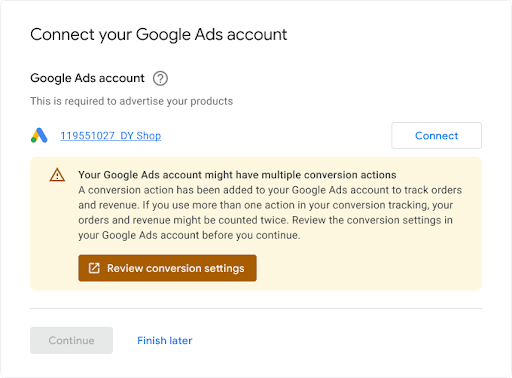
Mevcut bir Google Ads hesabını bağlayan satıcılara, hesaplarında dönüşüm izlemenin zaten ayarlanmış olabileceğiyle ilgili bir bildirim göstermenizi öneririz. Bu durumda, çözülmesi gereken çakışmalar olabilir. Aşağıda bir örnek verilmiştir.
Teknik Rehberlik
Dönüşüm izleme özelliğinin işleyiş şekli Bu bölümde her adım daha ayrıntılı olarak açıklanmaktadır:
Satıcının web sitesinde yapılan satın alma işlemlerini (ve isteğe bağlı olarak diğer müşteri işlemlerini) izlemek için satıcının Ads hesabında bir "ConversionAction" oluşturursunuz.
Bu dönüşüm işlemi için etiketi veya kod snippet'ini bir web sitesine ya da mobil uygulamaya eklersiniz. Ayrıntılar için Web siteniz için dönüşüm izlemeyi ayarlama başlıklı makaleyi inceleyin.
Müşteri reklamı tıkladığında, müşterinin bilgisayarına veya mobil cihazına geçici bir çerez yerleştirilir.
Müşteri, reklamveren için tanımlanan işlemi tamamladığında Google, çerezi (eklenen kod snippet'i aracılığıyla) tanır ve uygunsa "değer" gibi diğer parametrelerle birlikte bir dönüşüm kaydeder.
Ön koşullar
Başlamadan önce Google etiketi geliştirici kimliğinizin olduğundan emin olun. Google etiketi Geliştirici Kimliğiniz yoksa Google etiketi Geliştirici Kimliği istek formunu doldurun. Geliştirici kimliğiniz, son kullanıcılarınızın web sitesi ölçüm koduna eklediği ölçüm kimliği veya dönüşüm kimliği gibi diğer kimliklerden farklıdır.
Dönüşüm işlemleri oluşturma ve yapılandırma
Aşağıdaki örneklerde, dönüşüm işleminin nasıl oluşturulacağı ve bir Ads hesabına nasıl ekleneceği gösterilmektedir. Her örnek, arka plandaki tüm kimlik doğrulama görevlerini sizin için gerçekleştirir ve dönüşüm işlemi oluşturma sürecinde size yol gösterir:
Java
// Copyright 2018 Google LLC // // Licensed under the Apache License, Version 2.0 (the "License"); // you may not use this file except in compliance with the License. // You may obtain a copy of the License at // // https://www.apache.org/licenses/LICENSE-2.0 // // Unless required by applicable law or agreed to in writing, software // distributed under the License is distributed on an "AS IS" BASIS, // WITHOUT WARRANTIES OR CONDITIONS OF ANY KIND, either express or implied. // See the License for the specific language governing permissions and // limitations under the License. package com.google.ads.googleads.examples.remarketing; import static com.google.ads.googleads.examples.utils.CodeSampleHelper.getPrintableDateTime; import com.beust.jcommander.Parameter; import com.google.ads.googleads.examples.utils.ArgumentNames; import com.google.ads.googleads.examples.utils.CodeSampleParams; import com.google.ads.googleads.lib.GoogleAdsClient; import com.google.ads.googleads.v25.enums.ConversionActionCategoryEnum.ConversionActionCategory; import com.google.ads.googleads.v25.enums.ConversionActionStatusEnum.ConversionActionStatus; import com.google.ads.googleads.v25.enums.ConversionActionTypeEnum.ConversionActionType; import com.google.ads.googleads.v25.errors.GoogleAdsError; import com.google.ads.googleads.v25.errors.GoogleAdsException; import com.google.ads.googleads.v25.resources.ConversionAction; import com.google.ads.googleads.v25.resources.ConversionAction.ValueSettings; import com.google.ads.googleads.v25.services.ConversionActionOperation; import com.google.ads.googleads.v25.services.ConversionActionServiceClient; import com.google.ads.googleads.v25.services.MutateConversionActionResult; import com.google.ads.googleads.v25.services.MutateConversionActionsResponse; import java.io.FileNotFoundException; import java.io.IOException; import java.util.Collections; /** Adds a conversion action. */ public class AddConversionAction { private static class AddConversionActionParams extends CodeSampleParams { @Parameter(names = ArgumentNames.CUSTOMER_ID, required = true) private Long customerId; } public static void main(String[] args) { AddConversionActionParams params = new AddConversionActionParams(); if (!params.parseArguments(args)) { // Either pass the required parameters for this example on the command line, or insert them // into the code here. See the parameter class definition above for descriptions. params.customerId = Long.parseLong("INSERT_CUSTOMER_ID_HERE"); } GoogleAdsClient googleAdsClient = null; try { googleAdsClient = GoogleAdsClient.newBuilder().fromPropertiesFile().build(); } catch (FileNotFoundException fnfe) { System.err.printf( "Failed to load GoogleAdsClient configuration from file. Exception: %s%n", fnfe); System.exit(1); } catch (IOException ioe) { System.err.printf("Failed to create GoogleAdsClient. Exception: %s%n", ioe); System.exit(1); } try { new AddConversionAction().runExample(googleAdsClient, params.customerId); } catch (GoogleAdsException gae) { // GoogleAdsException is the base class for most exceptions thrown by an API request. // Instances of this exception have a message and a GoogleAdsFailure that contains a // collection of GoogleAdsErrors that indicate the underlying causes of the // GoogleAdsException. System.err.printf( "Request ID %s failed due to GoogleAdsException. Underlying errors:%n", gae.getRequestId()); int i = 0; for (GoogleAdsError googleAdsError : gae.getGoogleAdsFailure().getErrorsList()) { System.err.printf(" Error %d: %s%n", i++, googleAdsError); } System.exit(1); } } /** * Runs the example. * * @param googleAdsClient the Google Ads API client. * @param customerId the client customer ID. * @throws GoogleAdsException if an API request failed with one or more service errors. */ private void runExample(GoogleAdsClient googleAdsClient, long customerId) { // Creates a ConversionAction. ConversionAction conversionAction = ConversionAction.newBuilder() // Note that conversion action names must be unique. If a conversion action already // exists with the specified conversion_action_name the create operation will fail with // a ConversionActionError.DUPLICATE_NAME error. .setName("Earth to Mars Cruises Conversion #" + getPrintableDateTime()) .setCategory(ConversionActionCategory.DEFAULT) .setType(ConversionActionType.WEBPAGE) .setStatus(ConversionActionStatus.ENABLED) .setViewThroughLookbackWindowDays(15L) .setValueSettings( ValueSettings.newBuilder() .setDefaultValue(23.41) .setAlwaysUseDefaultValue(true) .build()) .build(); // Creates the operation. ConversionActionOperation operation = ConversionActionOperation.newBuilder().setCreate(conversionAction).build(); try (ConversionActionServiceClient conversionActionServiceClient = googleAdsClient.getLatestVersion().createConversionActionServiceClient()) { MutateConversionActionsResponse response = conversionActionServiceClient.mutateConversionActions( Long.toString(customerId), Collections.singletonList(operation)); System.out.printf("Added %d conversion actions:%n", response.getResultsCount()); for (MutateConversionActionResult result : response.getResultsList()) { System.out.printf( "New conversion action added with resource name: '%s'%n", result.getResourceName()); } } } }
C#
// Copyright 2019 Google LLC // // Licensed under the Apache License, Version 2.0 (the "License"); // you may not use this file except in compliance with the License. // You may obtain a copy of the License at // // http://www.apache.org/licenses/LICENSE-2.0 // // Unless required by applicable law or agreed to in writing, software // distributed under the License is distributed on an "AS IS" BASIS, // WITHOUT WARRANTIES OR CONDITIONS OF ANY KIND, either express or implied. // See the License for the specific language governing permissions and // limitations under the License. using CommandLine; using Google.Ads.Gax.Examples; using Google.Ads.GoogleAds.Lib; using Google.Ads.GoogleAds.V25.Errors; using Google.Ads.GoogleAds.V25.Resources; using Google.Ads.GoogleAds.V25.Services; using System; using static Google.Ads.GoogleAds.V25.Enums.ConversionActionCategoryEnum.Types; using static Google.Ads.GoogleAds.V25.Enums.ConversionActionStatusEnum.Types; using static Google.Ads.GoogleAds.V25.Enums.ConversionActionTypeEnum.Types; namespace Google.Ads.GoogleAds.Examples.V25 { /// <summary> /// This code example illustrates adding a conversion action. /// </summary> public class AddConversionAction : ExampleBase { /// <summary> /// Command line options for running the <see cref="AddConversionAction"/> example. /// </summary> public class Options : OptionsBase { /// <summary> /// The Google Ads customer ID for which the conversion action is added. /// </summary> [Option("customerId", Required = true, HelpText = "The Google Ads customer ID for which the conversion action is added.")] public long CustomerId { get; set; } } /// <summary> /// Main method, to run this code example as a standalone application. /// </summary> /// <param name="args">The command line arguments.</param> public static void Main(string[] args) { Options options = ExampleUtilities.ParseCommandLine<Options>(args); AddConversionAction codeExample = new AddConversionAction(); Console.WriteLine(codeExample.Description); codeExample.Run(new GoogleAdsClient(), options.CustomerId); } /// <summary> /// Returns a description about the code example. /// </summary> public override string Description => "This code example illustrates adding a conversion action."; /// <summary> /// Runs the code example. /// </summary> /// <param name="client">The Google Ads client.</param> /// <param name="customerId">The Google Ads customer ID for which the conversion action is /// added.</param> public void Run(GoogleAdsClient client, long customerId) { // Get the ConversionActionService. ConversionActionServiceClient conversionActionService = client.GetService(Services.V25.ConversionActionService); // Note that conversion action names must be unique. // If a conversion action already exists with the specified name the create operation // will fail with a ConversionAction.DUPLICATE_NAME error. string ConversionActionName = "Earth to Mars Cruises Conversion #" + ExampleUtilities.GetRandomString(); // Add a conversion action. ConversionAction conversionAction = new ConversionAction() { Name = ConversionActionName, Category = ConversionActionCategory.Default, Type = ConversionActionType.Webpage, Status = ConversionActionStatus.Enabled, ViewThroughLookbackWindowDays = 15, ValueSettings = new ConversionAction.Types.ValueSettings() { DefaultValue = 23.41, AlwaysUseDefaultValue = true } }; // Create the operation. ConversionActionOperation operation = new ConversionActionOperation() { Create = conversionAction }; try { // Create the conversion action. MutateConversionActionsResponse response = conversionActionService.MutateConversionActions(customerId.ToString(), new ConversionActionOperation[] { operation }); // Display the results. foreach (MutateConversionActionResult newConversionAction in response.Results) { Console.WriteLine($"New conversion action with resource name = " + $"'{newConversionAction.ResourceName}' was added."); } } catch (GoogleAdsException e) { Console.WriteLine("Failure:"); Console.WriteLine($"Message: {e.Message}"); Console.WriteLine($"Failure: {e.Failure}"); Console.WriteLine($"Request ID: {e.RequestId}"); throw; } } } }
PHP
<?php /** * Copyright 2018 Google LLC * * Licensed under the Apache License, Version 2.0 (the "License"); * you may not use this file except in compliance with the License. * You may obtain a copy of the License at * * https://www.apache.org/licenses/LICENSE-2.0 * * Unless required by applicable law or agreed to in writing, software * distributed under the License is distributed on an "AS IS" BASIS, * WITHOUT WARRANTIES OR CONDITIONS OF ANY KIND, either express or implied. * See the License for the specific language governing permissions and * limitations under the License. */ namespace Google\Ads\GoogleAds\Examples\Remarketing; require __DIR__ . '/../../vendor/autoload.php'; use GetOpt\GetOpt; use Google\Ads\GoogleAds\Examples\Utils\ArgumentNames; use Google\Ads\GoogleAds\Examples\Utils\ArgumentParser; use Google\Ads\GoogleAds\Examples\Utils\Helper; use Google\Ads\GoogleAds\Lib\V25\GoogleAdsClient; use Google\Ads\GoogleAds\Lib\V25\GoogleAdsClientBuilder; use Google\Ads\GoogleAds\Lib\V25\GoogleAdsException; use Google\Ads\GoogleAds\Lib\OAuth2TokenBuilder; use Google\Ads\GoogleAds\V25\Enums\ConversionActionCategoryEnum\ConversionActionCategory; use Google\Ads\GoogleAds\V25\Enums\ConversionActionStatusEnum\ConversionActionStatus; use Google\Ads\GoogleAds\V25\Enums\ConversionActionTypeEnum\ConversionActionType; use Google\Ads\GoogleAds\V25\Errors\GoogleAdsError; use Google\Ads\GoogleAds\V25\Resources\ConversionAction; use Google\Ads\GoogleAds\V25\Resources\ConversionAction\ValueSettings; use Google\Ads\GoogleAds\V25\Services\ConversionActionOperation; use Google\Ads\GoogleAds\V25\Services\MutateConversionActionsRequest; use Google\ApiCore\ApiException; /** * This example illustrates adding a conversion action. */ class AddConversionAction { private const CUSTOMER_ID = 'INSERT_CUSTOMER_ID_HERE'; public static function main() { // Either pass the required parameters for this example on the command line, or insert them // into the constants above. $options = (new ArgumentParser())->parseCommandArguments( [ ArgumentNames::CUSTOMER_ID => GetOpt::REQUIRED_ARGUMENT ] ); // Generate a refreshable OAuth2 credential for authentication. $oAuth2Credential = (new OAuth2TokenBuilder())->fromFile()->build(); // Construct a Google Ads client configured from a properties file and the // OAuth2 credentials above. $googleAdsClient = (new GoogleAdsClientBuilder()) ->fromFile() ->withOAuth2Credential($oAuth2Credential) ->build(); try { self::runExample( $googleAdsClient, $options[ArgumentNames::CUSTOMER_ID] ?: self::CUSTOMER_ID ); } catch (GoogleAdsException $googleAdsException) { printf( "Request with ID '%s' has failed.%sGoogle Ads failure details:%s", $googleAdsException->getRequestId(), PHP_EOL, PHP_EOL ); foreach ($googleAdsException->getGoogleAdsFailure()->getErrors() as $error) { /** * @var GoogleAdsError $error */ printf( "\t%s: %s%s", $error->getErrorCode()->getErrorCode(), $error->getMessage(), PHP_EOL ); } exit(1); } catch (ApiException $apiException) { printf( "ApiException was thrown with message '%s'.%s", $apiException->getMessage(), PHP_EOL ); exit(1); } } /** * Runs the example. * * @param GoogleAdsClient $googleAdsClient the Google Ads API client * @param int $customerId the customer ID */ public static function runExample(GoogleAdsClient $googleAdsClient, int $customerId) { // Creates a conversion action. $conversionAction = new ConversionAction( [ // Note that conversion action names must be unique. // If a conversion action already exists with the specified conversion_action_name // the create operation will fail with a ConversionActionError.DUPLICATE_NAME error. 'name' => 'Earth to Mars Cruises Conversion #' . Helper::getPrintableDatetime(), 'category' => ConversionActionCategory::PBDEFAULT, 'type' => ConversionActionType::WEBPAGE, 'status' => ConversionActionStatus::ENABLED, 'view_through_lookback_window_days' => 15, 'value_settings' => new ValueSettings( [ 'default_value' => 23.41, 'always_use_default_value' => true ] ) ] ); // Creates a conversion action operation. $conversionActionOperation = new ConversionActionOperation(); $conversionActionOperation->setCreate($conversionAction); // Issues a mutate request to add the conversion action. $conversionActionServiceClient = $googleAdsClient->getConversionActionServiceClient(); $response = $conversionActionServiceClient->mutateConversionActions( MutateConversionActionsRequest::build($customerId, [$conversionActionOperation]) ); printf("Added %d conversion actions:%s", $response->getResults()->count(), PHP_EOL); foreach ($response->getResults() as $addedConversionAction) { /** * @var ConversionAction $addedConversionAction */ printf( "New conversion action added with resource name: '%s'%s", $addedConversionAction->getResourceName(), PHP_EOL ); } } } AddConversionAction::main();
Python
#!/usr/bin/env python # Copyright 2018 Google LLC # # Licensed under the Apache License, Version 2.0 (the "License"); # you may not use this file except in compliance with the License. # You may obtain a copy of the License at # # https://www.apache.org/licenses/LICENSE-2.0 # # Unless required by applicable law or agreed to in writing, software # distributed under the License is distributed on an "AS IS" BASIS, # WITHOUT WARRANTIES OR CONDITIONS OF ANY KIND, either express or implied. # See the License for the specific language governing permissions and # limitations under the License. """This example illustrates adding a conversion action.""" import argparse import sys import uuid from google.ads.googleads.client import GoogleAdsClient from google.ads.googleads.errors import GoogleAdsException from google.ads.googleads.v24.resources.types.conversion_action import ( ConversionAction, ) from google.ads.googleads.v24.services.services.conversion_action_service import ( ConversionActionServiceClient, ) from google.ads.googleads.v24.services.types.conversion_action_service import ( ConversionActionOperation, MutateConversionActionsResponse, ) def main(client: GoogleAdsClient, customer_id: str) -> None: conversion_action_service: ConversionActionServiceClient = ( client.get_service("ConversionActionService") ) # Create the operation. conversion_action_operation: ConversionActionOperation = client.get_type( "ConversionActionOperation" ) # Create conversion action. conversion_action: ConversionAction = conversion_action_operation.create # Note that conversion action names must be unique. If a conversion action # already exists with the specified conversion_action_name, the create # operation will fail with a ConversionActionError.DUPLICATE_NAME error. conversion_action.name = f"Earth to Mars Cruises Conversion {uuid.uuid4()}" conversion_action.type_ = ( client.enums.ConversionActionTypeEnum.UPLOAD_CLICKS ) conversion_action.category = ( client.enums.ConversionActionCategoryEnum.DEFAULT ) conversion_action.status = client.enums.ConversionActionStatusEnum.ENABLED conversion_action.view_through_lookback_window_days = 15 # Create a value settings object. value_settings: ConversionAction.ValueSettings = ( conversion_action.value_settings ) value_settings.default_value = 15.0 value_settings.always_use_default_value = True # Add the conversion action. conversion_action_response: MutateConversionActionsResponse = ( conversion_action_service.mutate_conversion_actions( customer_id=customer_id, operations=[conversion_action_operation], ) ) print( "Created conversion action " f'"{conversion_action_response.results[0].resource_name}".' ) if __name__ == "__main__": parser: argparse.ArgumentParser = argparse.ArgumentParser( description="Adds a conversion action for specified customer." ) # The following argument(s) should be provided to run the example. parser.add_argument( "-c", "--customer_id", type=str, required=True, help="The Google Ads customer ID.", ) args: argparse.Namespace = parser.parse_args() # GoogleAdsClient will read the google-ads.yaml configuration file in the # home directory if none is specified. googleads_client: GoogleAdsClient = GoogleAdsClient.load_from_storage( version="v24" ) try: main(googleads_client, args.customer_id) except GoogleAdsException as ex: print( f'Request with ID "{ex.request_id}" failed with status ' f'"{ex.error.code().name}" and includes the following errors:' ) for error in ex.failure.errors: print(f'\tError with message "{error.message}".') if error.location: for field_path_element in error.location.field_path_elements: print(f"\t\tOn field: {field_path_element.field_name}") sys.exit(1)
Ruby
#!/usr/bin/env ruby # Encoding: utf-8 # # Copyright 2018 Google LLC # # Licensed under the Apache License, Version 2.0 (the "License"); # you may not use this file except in compliance with the License. # You may obtain a copy of the License at # # https://www.apache.org/licenses/LICENSE-2.0 # # Unless required by applicable law or agreed to in writing, software # distributed under the License is distributed on an "AS IS" BASIS, # WITHOUT WARRANTIES OR CONDITIONS OF ANY KIND, either express or implied. # See the License for the specific language governing permissions and # limitations under the License. # # This code example illustrates adding a conversion action. require 'optparse' require 'google/ads/google_ads' require 'date' require_relative '../shared/error_handler.rb' def add_conversion_action(customer_id) # GoogleAdsClient will read a config file from # ENV['HOME']/google_ads_config.rb when called without parameters client = Google::Ads::GoogleAds::GoogleAdsClient.new # Add a conversion action. conversion_action = client.resource.conversion_action do |ca| ca.name = "Earth to Mars Cruises Conversion #{(Time.new.to_f * 100).to_i}" ca.type = :UPLOAD_CLICKS ca.category = :DEFAULT ca.status = :ENABLED ca.view_through_lookback_window_days = 15 # Create a value settings object. ca.value_settings = client.resource.value_settings do |vs| vs.default_value = 15 vs.always_use_default_value = true end end # Create the operation. conversion_action_operation = client.operation.create_resource.conversion_action(conversion_action) # Add the ad group ad. response = client.service.conversion_action.mutate_conversion_actions( customer_id: customer_id, operations: [conversion_action_operation], ) puts "New conversion action with resource name = #{response.results.first.resource_name}." end if __FILE__ == $0 options = {} # The following parameter(s) should be provided to run the example. You can # either specify these by changing the INSERT_XXX_ID_HERE values below, or on # the command line. # # Parameters passed on the command line will override any parameters set in # code. # # Running the example with -h will print the command line usage. options[:customer_id] = 'INSERT_CUSTOMER_ID_HERE' OptionParser.new do |opts| opts.banner = sprintf('Usage: %s [options]', File.basename(__FILE__)) opts.separator '' opts.separator 'Options:' opts.on('-C', '--customer-id CUSTOMER-ID', String, 'Customer ID') do |v| options[:customer_id] = v end opts.separator '' opts.separator 'Help:' opts.on_tail('-h', '--help', 'Show this message') do puts opts exit end end.parse! begin add_conversion_action(options.fetch(:customer_id).tr("-", "")) rescue Google::Ads::GoogleAds::Errors::GoogleAdsError => e GoogleAdsErrorHandler.handle_google_ads_error(e) raise # Re-raise the error to maintain original script behavior. end end
Perl
#!/usr/bin/perl -w # # Copyright 2019, Google LLC # # Licensed under the Apache License, Version 2.0 (the "License"); # you may not use this file except in compliance with the License. # You may obtain a copy of the License at # # http://www.apache.org/licenses/LICENSE-2.0 # # Unless required by applicable law or agreed to in writing, software # distributed under the License is distributed on an "AS IS" BASIS, # WITHOUT WARRANTIES OR CONDITIONS OF ANY KIND, either express or implied. # See the License for the specific language governing permissions and # limitations under the License. # # This example illustrates adding a conversion action. use strict; use warnings; use utf8; use FindBin qw($Bin); use lib "$Bin/../../lib"; use Google::Ads::GoogleAds::Client; use Google::Ads::GoogleAds::Utils::GoogleAdsHelper; use Google::Ads::GoogleAds::V25::Resources::ConversionAction; use Google::Ads::GoogleAds::V25::Resources::ValueSettings; use Google::Ads::GoogleAds::V25::Enums::ConversionActionCategoryEnum qw(DEFAULT); use Google::Ads::GoogleAds::V25::Enums::ConversionActionTypeEnum qw(WEBPAGE); use Google::Ads::GoogleAds::V25::Enums::ConversionActionStatusEnum qw(ENABLED); use Google::Ads::GoogleAds::V25::Services::ConversionActionService::ConversionActionOperation; use Getopt::Long qw(:config auto_help); use Pod::Usage; use Cwd qw(abs_path); use Data::Uniqid qw(uniqid); # The following parameter(s) should be provided to run the example. You can # either specify these by changing the INSERT_XXX_ID_HERE values below, or on # the command line. # # Parameters passed on the command line will override any parameters set in # code. # # Running the example with -h will print the command line usage. my $customer_id = "INSERT_CUSTOMER_ID_HERE"; sub add_conversion_action { my ($api_client, $customer_id) = @_; # Note that conversion action names must be unique. # If a conversion action already exists with the specified conversion_action_name, # the create operation fails with error ConversionActionError.DUPLICATE_NAME. my $conversion_action_name = "Earth to Mars Cruises Conversion #" . uniqid(); # Create a conversion action. my $conversion_action = Google::Ads::GoogleAds::V25::Resources::ConversionAction->new({ name => $conversion_action_name, category => DEFAULT, type => WEBPAGE, status => ENABLED, viewThroughLookbackWindowDays => 15, valueSettings => Google::Ads::GoogleAds::V25::Resources::ValueSettings->new({ defaultValue => 23.41, alwaysUseDefaultValue => "true" })}); # Create a conversion action operation. my $conversion_action_operation = Google::Ads::GoogleAds::V25::Services::ConversionActionService::ConversionActionOperation ->new({create => $conversion_action}); # Add the conversion action. my $conversion_actions_response = $api_client->ConversionActionService()->mutate({ customerId => $customer_id, operations => [$conversion_action_operation]}); printf "New conversion action added with resource name: '%s'.\n", $conversion_actions_response->{results}[0]{resourceName}; return 1; } # Don't run the example if the file is being included. if (abs_path($0) ne abs_path(__FILE__)) { return 1; } # Get Google Ads Client, credentials will be read from ~/googleads.properties. my $api_client = Google::Ads::GoogleAds::Client->new(); # By default examples are set to die on any server returned fault. $api_client->set_die_on_faults(1); # Parameters passed on the command line will override any parameters set in code. GetOptions("customer_id=s" => \$customer_id); # Print the help message if the parameters are not initialized in the code nor # in the command line. pod2usage(2) if not check_params($customer_id); # Call the example. add_conversion_action($api_client, $customer_id =~ s/-//gr); =pod =head1 NAME add_conversion_action =head1 DESCRIPTION This example illustrates adding a conversion action. =head1 SYNOPSIS add_conversion_action.pl [options] -help Show the help message. -customer_id The Google Ads customer ID. =cut
curl
Önceki örnekler genel nitelikli olduğundan, ConversionAction'ın Maksimum Performans için doğru şekilde yapılandırılmasına yardımcı olacak ek notları aşağıda bulabilirsiniz. Dönüşüm işlemlerinizin her biri aşağıdaki gibi yapılandırılmalıdır:
Tür: Bu satın alma etkinlikleri bir web sitesinde gerçekleştiği için ConversionActionType'ı WEBPAGE olarak ayarlayın.
Teklif verilebilir: Kampanyaları satışlara göre optimize etmek için birincil dönüşüm işleminiz (satın alma) için
trueolarak ayarlayın. İkincil dönüşüm işlemleri (ör.sepete ekleme) için değerifalseolarak ayarlayın.Kategori: Her bir dönüşüm işleminiz (birincil veya ikincil) için ConversionActionCategory'yi ayarlayın. Aşağıda, uygulanmasını önerdiğimiz 7 dönüşüm işleminin her biri için ilgili dönüşüm işlemi kategorisini bulabilirsiniz. Not: Google Ads, dönüşüm işlemlerini kategorilerine göre otomatik olarak standart bir dönüşüm hedefine atar. Örneğin, satın alma dönüşüm işlemleri "Satın Alma" adlı standart dönüşüm hedefine atanır. Daha sonra, Maksimum Performans kampanyasını bu satın alma hedefi için optimizasyon yapacak şekilde yapılandırabilirsiniz.
Önerilen dönüşüm işlemlerinin listesini aşağıda bulabilirsiniz. En azından ilk dört dönüşüm işlemini ve mümkün olduğunca çok sayıda diğer önerilen işlemi uygulamanızı öneririz.
Online satışlarla ilgili ek etkinlikler de uygulayabilirsiniz. Daha ayrıntılı izleme için ek dönüşüm işlemleri veya özelleştirilmiş dönüşüm işlemleri de oluşturabilirsiniz (örneğin, kullanıcı web sitesindeki arama seçeneğini her kullandığında "ödeme bilgilerini ekle" işlemi veya kullanıcı web sitesindeki arama seçeneğini her kullandığında "arama" işlemi). İkincil dönüşüm işlemleri, satıcılarınız için ek izleme sağlar ve Google Ads tarafından gözlem amaçlı kullanılır.
| Öncelik | Dönüşüm İşlemi | Dönüşüm İşlemi Kategorisi | Google etiketi etkinlik adı | Açıklama |
|---|---|---|---|---|
| Zorunlu | Satın al | SATIN ALMA | purchase | Kullanıcı satın alma işlemini tamamladığında |
| Tüm mağaza geliştiriciler için önemle tavsiye edilir. | Sepete ekle | ADD_TO_CART | add_to_cart | Kullanıcı, alışveriş sepetine ürün eklediğinde |
| Tüm mağaza geliştiriciler için önemle tavsiye edilir. | Ödeme başlatma | BEGIN_CHECKOUT | begin_checkout | Kullanıcı ödeme işlemine başladığında |
| Tüm mağaza geliştiriciler için önemle tavsiye edilir. | Ürünü görüntüle | PAGE_VIEW | page_view | Kullanıcı bir ürün sayfası açtığında |
| Uygun durumlarda kesinlikle önerilir (genellikle mağaza oluşturucular için geçerli değildir) | Kaydol | KAYDOLMA | sign_up | Kullanıcı bir hesaba kaydolduğunda |
| Uygun durumlarda kesinlikle önerilir (genellikle mağaza oluşturucular için geçerli değildir) | Potansiyel müşteri oluşturma | SUBMIT_LEAD_FORM | generate_lead | Kullanıcı, bir form aracılığıyla potansiyel müşteri oluşturur |
| Uygun durumlarda kesinlikle önerilir (genellikle mağaza oluşturucular için geçerli değildir) | Abone ol | SUBSCRIBE_PAID | geçerli değil (özel) | Kullanıcı, ücretli bir hizmete abone olur |
| Uygun durumlarda kesinlikle önerilir (genellikle mağaza oluşturucular için geçerli değildir) | Randevu alma | BOOK_APPOINTMENT | geçerli değil (özel) | Kullanıcı randevu alır |
| Uygun durumlarda kesinlikle önerilir (genellikle mağaza oluşturucular için geçerli değildir) | Fiyat teklifi isteyin | REQUEST_QUOTE | geçerli değil (özel) | Kullanıcı, fiyat tahmini isteyen bir form gönderir. |
Mevcut bir Ads hesabına sahip satıcılar
Satıcıların mevcut bir Ads hesabı ile katılmasına izin verirseniz hesapta zaten dönüşüm işlemleri olduğu bir durumla karşılaşabilirsiniz. Düzgün şekilde ayarlandığı garanti edilmediği için mevcut bir dönüşüm işlemini kullanmanızı önermiyoruz. Ayrıca, bu olası senaryoları ele almak için ek adımlar uygulamanız gerekir:
Hesapta, hepsi "hesap için varsayılan" olarak işaretlenmiş birden fazla hedef (örneğin, satın alma işlemleri + sayfa görüntülemeleri + kişiler) var. Yeni bir kampanya oluşturulduğunda varsayılan olarak bu hedeflerin tümüne yönelik optimizasyon yapılır. Maksimum Performans kampanyası için bu durum geçerli değildir.
Hesapta, satın alma işlemlerini izlemek için zaten bir veya daha fazla dönüşüm işlemi var ve bu işlemler Satın Alma işlemleri hedefi altında gruplandırılmış. Bu, iki dönüşüm etiketi tetiklendiği için kampanyanın bir satın alma işlemini iki kez saydığı anlamına gelir.
Maksimum Performans kampanyasında özel dönüşüm işleminizin ve yalnızca bu işlemin kullanıldığından emin olmak için:
CustomConversionGoal oluşturun ve satın alma dönüşüm işleminizi hedefin
conversion_actions[]listesine ekleyin. Durumu ETKİN olarak ayarlayın.Maksimum Performans kampanyasının ConversionGoalCampaignConfig bölümünde, adım 1'de oluşturduğunuz özel hedef için
custom_conversion_goaldeğerini ayarlayın.(2) numaralı adımın sonucu olarak Google Ads, kampanyanın ConversionGoalCampaignConfig'ini otomatik olarak güncellemelidir. Böylece
goal_config_level, CAMPAIGN olarak ayarlanır (hesap varsayılan hedeflerini kullanmaya yönlendirecek olan CUSTOMER yerine). Ancak bunun gerçekten gerçekleştiğini tekrar kontrol etmenizde fayda vardır.
Dönüşüm işleminin etiketini alma
Dönüşüm işlemini oluşturduktan sonra, reklamverenin web sitesindeki dönüşüm sayfasına etiket adı verilen ilgili kod snippet'ini eklemeniz gerekir. Google Ads'in müşterinin tarayıcısından bağımsız olarak tüm dönüşümleri ölçebildiğinden emin olmak için güncellenmiş Google Ads dönüşüm izleme etiketini kullanın. Bu etiket iki bölümden oluşur:
global_site_tag, reklamverenin web sitesinin her sayfasına yüklenmelidir.event_snippet, ödeme onayı veya potansiyel müşteri formu gönderme sayfası gibi bir dönüşüm işlemini gösteren web sayfalarına yerleştirilmelidir.
Bu iki bölümü ConversionActionService ile alabilirsiniz.
Etiket, müşteriye veya müşteriyi siteye getiren reklam tıklamasına ait benzersiz bir tanımlayıcıyı depolayan çerezler ayarlar. Çerezler, reklam tıklama bilgilerini dönüşüm izleme etiketine dahil olan bir Google tıklama tanımlayıcısı (GCLID) parametresinden alır. Google Ads'in bir Google reklamının her gösterimi için sağladığı benzersiz kimlik olan GCLID'yi yakalamak ve depolamak için reklamverenin web sitesini ve potansiyel müşteri izleme sistemini etkinleştirmeniz gerekir.
Global etiket ve nereye yükleneceği hakkında daha fazla bilgi
Google etiketi (gtag.js), hem Google Ads'e hem de Google Analytics'e etkinlik verileri göndermenize olanak tanıyan bir etiketleme çerçevesi ve API'sidir. Global site etiketi, dönüşümlerinizi izlemek için bir etkinlik snippet'i veya telefon snippet'iyle uyum içinde çalışır. Google etiketini reklamverenin sitesindeki her sayfanın <head> bölümüne ekleyin ve Google Ads ile çalışacak şekilde yapılandırın. Ardından, etkinlikleri yakalamak ve verileri Google Ads'e göndermek için gtag() komutlarını kullanabilirsiniz.
Bu özelliğin nasıl çalıştığını anlamak için Google Ads dönüşüm izleme için global site etiketini kullanma başlıklı makaleyi inceleyin.
Google etiketiyle aşağıdaki komutları kullanırsınız:
config: Bir Google ürününü (Google Ads, Analytics vb.) başlatın, ayarları yapılandırın ve bir hesaba veri göndermeye hazırlanın.
event: Satın alma (önerilir) veya alışveriş sepetine ekleme (ikincil dönüşüm işlemleri) gibi bir etkinlik göndererek dönüşüm kaydedin. gtag.js etkinlik referans kılavuzunu incelemenizi öneririz.
set: Sayfadaki tüm etkinlikler için ortak olan parametreleri (ör. para birimi) ayarlayın.
Aşağıdaki örnek, Google Ads'e veri göndermek için kullanılan global site etiketinin bir JavaScript kodu snippet'idir. GOOGLE_CONVERSION_ID yer tutucu değeri, tek bir reklamveren hesabına ait benzersiz bir sayısal kimliktir.
<!-- Google Tag (gtag.js) - Google Ads: GOOGLE_CONVERSION_ID -->
<script async src="https://www.googletagmanager.com/gtag/js?id=AW-GOOGLE_CONVERSION_ID">
</script>
<script>
  window.dataLayer = window.dataLayer || [];
  function gtag(){dataLayer.push(arguments)};
  gtag('js', new Date());
   gtag('set', 'developer_id.<developer ID>', true); // Replace with your Google tag Developer ID
  gtag('config', 'AW-GOOGLE_CONVERSION_ID');
</script>
Google etiketi snippet'i sayfa başına yalnızca bir kez görünmelidir. Mevcut bir gtag.js örneği varsa yeni etiket kimliklerini mevcut etikete eklemeniz gerekir. Verileri birden fazla hesaba göndermek için kullandığınız her hesap için "config" komutuna bir çağrı ekleyebilir ve her hesabın dönüşüm kimliğini belirtebilirsiniz. Aşağıdaki örnekte gösterildiği gibi:
<!-- Google Tag (gtag.js) - Google Ads: GOOGLE_CONVERSION_ID_1 -->
<script async src="https://www.googletagmanager.com/gtag/js?id=AW-GOOGLE_CONVERSION_ID_1"></script>
<script>
  window.dataLayer = window.dataLayer || [];
  function gtag(){dataLayer.push(arguments)};
  gtag('js', new Date());
  gtag('config', 'AW-GOOGLE_CONVERSION_ID_1');
  gtag('config', 'AW-GOOGLE_CONVERSION_ID_2');
</script>
Etkinlik snippet'i ve nereye yükleneceği hakkında daha fazla bilgi
Satın alma dönüşümü izleme özelliğinin çalışması için satın alma etkinliği snippet'i doğrudan dönüşüm sayfasına yüklenmelidir. Bu genellikle sipariş onayı sayfasıdır. Etkinlik snippet'i, global etiket snippet'inden sonra kodun herhangi bir yerine yerleştirilebilir. İkincil dönüşüm işlemlerine (ör. alışveriş sepetine ekleme) ait etkinlik snippet'leri ilgili sayfalara yerleştirilmelidir.
Aşağıdaki örnek snippet'te AW-CONVERSION_ID ve gTag_developer_ID, Google Ads hesabınıza ve Google Etiketi geliştirici hesabınıza özgü dönüşüm kimliğini, AW-CONVERSION_LABEL ise her bir dönüşüm işlemine özgü dönüşüm etiketini belirtir:
<!-- Event snippet for a purchase conversion page -->
<script>
  gtag('event', 'conversion', {
       'send_to':'AW-CONVERSION_ID/CONVERSION_LABEL',
       'developer_id.<gTag developer ID>': true,
       'transaction_id': '<transaction_id (string)>' //unique ID for the transaction (e.g. an order ID); it's used for de-duplication purposes
       'value': 1.0,
       'currency': 'USD', //three-letter currency code, useful for advertisers who accept multiple currencies
       'country': 'US',
       'new_customer': false, //new customer acquisition goal
       'tax': 1.24, //tax cost-US only
       'shipping': 0.00, //shipping cost-US only
       'delivery_postal_code': '94043', //shipping data validation-US only
       'estimated_delivery_date': '2020-07-31', //shipping validation-US only
       'aw_merchant_id': 12345, //shipping validation-US only
       'aw_feed_country': 'US', //shipping validation-US only
       'aw_feed_language': 'EN', //shipping validation-US only
       'items': [
       {
             'id': 'P12345',
             'name': 'Android Warhol T-Shirt',
             'quantity': 2,
             'price': 12.04,
             'estimated_delivery_date': '2020-07-31', //shipping-US only
              'google_business_vertical': 'retail'
       }, …],
  });
</script>
Bazı parametreler isteğe bağlı olsa da her etkinlik için mümkün olduğunca fazla bilgi eklemeniz önerilir. Her etkinlik türü için hangi parametrelerin kullanılabildiği hakkında daha fazla bilgi edinin.
Parametreler, kullanıcıların web siteniz veya uygulamanızla etkileşim kurma yöntemleri hakkında ek bilgi sağlar.
Bir tıklamaya dayalı bir dönüşüm etkinliğini ölçmek istiyorsanız (ör.bir düğmede veya AJAX kullanan bir site için dinamik yanıtta) bunun yerine aşağıdaki snippet'i de kullanabilirsiniz:
<!-- Event snippet for test conversion click -->
In your html page, add the snippet and call gtag_report_conversion when someone clicks on the chosen link or button. -->
<script>
function gtag_report_conversion(url) {
  var callback = function () {
    if (typeof(url) != 'undefined') {
      window.location = url;
    }
  };
  gtag('event', 'conversion', {
      'send_to': 'AW-CONVERSION_ID/CONVERSION_LABEL',
      'value': 1.0,
      'event_callback': callback,
      //other parameters
  });
  return false;
}
</script>
İzin API'sini (izin modu olarak da bilinir) uygulama
Google etiketinde, kullanıcı iznini yönetmek için yerleşik bir izin API'si bulunur. Reklam amaçlı çerezler için kullanıcı iznini analiz amaçlı çerezler için kullanıcı izninden ayırt edebilir.
Beklenen sonuç, müşterilerin gtag('consent', 'update' {...}) çağrısını entegre etmesi ve müşterinin herhangi bir işlem yapmasının gerekmemesidir. Bu, Google etiketlerinin (Google Ads, Floodlight, Google Analytics, Dönüşüm Bağlayıcı) en son kullanıcı izni durumunu okuyabilmesini ve durumu Google'a yapılan ağ isteklerine (&gcs parametresi aracılığıyla) dahil edebilmesini sağlar.
Ek uygulama adımları, gtag('consent', default' {...}) durumunu dağıtmak veya reklamverenlerin dağıtmasına yardımcı olmak (ör. kullanıcı arayüzü aracılığıyla) ve Google etiketlerinin engellemesini kaldırmaktır (örnek: izne dayalı koşullu tetikleme yok). Böylece izin modu, etiketleri izin alınmış şekilde tetikleyebilir.
Uygulama ayrıntıları için İzin ayarlarını yönetme (web) başlıklı makaleyi inceleyin.
İpuçları
Google Ads yönetici hesabından,tek bir dönüşüm kodu etiketi kullanarak tüm reklamveren hesaplarınızdaki dönüşümleri izleyebilirsiniz. Hesaplar arası dönüşüm izleme hakkında bilgi edinin.
Dönüşüm izleme uygulamanızın çalışıp çalışmadığını test etmenin en iyi yolu, satıcılarınızın web sitelerinden birine (veya dahili bir test web sitesine) gidip gerçek bir satın alma işlemi yapmaktır. Ardından, Google Ads'in etiketinizi gördüğünü ve dönüşümleri başarıyla kaydettiğini doğrulamak için Google Tag Assistant aracında gözlem yapabilir ve bu sorun giderme kılavuzunu kullanabilirsiniz. Ek sorun giderme adımları için site geneline etiket uygulamayla ilgili sorunları giderme başlıklı makaleyi inceleyin.
Önceki dönüşüm etiketini, dönüşüm ölçümünüzün doğruluğunu artırabilen ve daha güçlü teklifler vermenizi sağlayan gelişmiş dönüşümlerle destekleyebilirsiniz. Gelişmiş dönüşümleri ayarlama hakkında daha fazla bilgi edinin. Gelişmiş dönüşümleri uygulamadan önce satıcılarınızın Google Ads'deki gelişmiş dönüşüm müşteri verileri politikalarına uyabildiğinden emin olmanız gerekir.