סקירה כללית
קישור יעיל באמצעות כניסה מבוססת-OAuth עם חשבון Google מוסיף כניסה באמצעות חשבון Google על גבי קישור OAuth. האפשרות הזו מספקת למשתמשי Google חוויית קישור חלקה, והיא גם מאפשרת יצירת חשבון. כך המשתמש יכול ליצור חשבון חדש בשירות שלכם באמצעות חשבון Google שלו.
כדי לקשר חשבונות באמצעות OAuth ו'כניסה באמצעות חשבון Google', צריך לבצע את השלבים הכלליים הבאים:
- קודם כל, צריך לבקש מהמשתמש לתת הסכמה לגישה לפרופיל ב-Google.
- משתמשים במידע בפרופיל כדי לבדוק אם חשבון המשתמש קיים.
- למשתמשים קיימים, מקשרים את החשבונות.
- אם לא מצאתם התאמה למשתמש Google במערכת האימות שלכם, צריך לאמת את אסימון הזהות שהתקבל מ-Google. לאחר מכן תוכלו ליצור משתמש על סמך פרטי הפרופיל שכלולים באסימון המזהה.
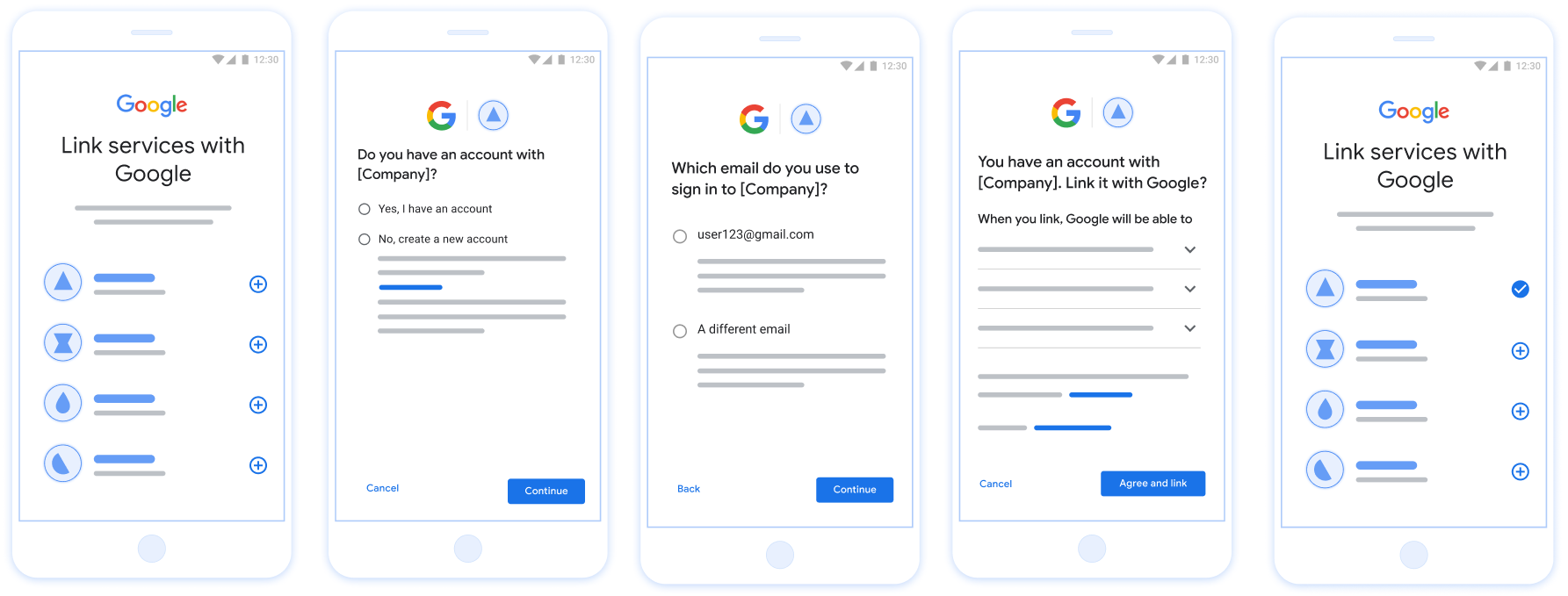
איור 1. קישור חשבון בטלפון של משתמש באמצעות קישור פשוט
קישור יעיל: תהליך OAuth + כניסה באמצעות חשבון Google
תרשים הרצף הבא מציג את האינטראקציות בין המשתמש, Google ונקודת הקצה של חילופי הטוקנים שלכם לקישור פשוט.
תפקידים ותחומי אחריות
בטבלה הבאה מוגדרים התפקידים ותחומי האחריות של הגורמים בתהליך המקוצר של קישור החשבונות.
| המשתמש / הרכיב | תפקיד ב-GAL | תחומי אחריות |
|---|---|---|
| אפליקציית Google / שרת | לקוח OAuth | מקבל את הסכמת המשתמש לכניסה באמצעות חשבון Google, מעביר הצהרות זהות (JWT) לשרת שלכם ושומר בצורה מאובטחת את הטוקנים שנוצרו. |
| נקודת הקצה של חילופי הטוקנים | ספק זהויות / שרת הרשאות | מאמת את הצהרות הזהות, בודק אם יש חשבונות קיימים, מטפל בכוונות לקישור חשבונות (check, get, create) ומנפיק אסימונים על סמך הכוונות המבוקשות. |
| Your Service API | שרת משאבים | מאפשר גישה לנתוני משתמש כשמוצג אסימון גישה תקין. |
הדרישות לקישור פשוט
- מטמיעים את תהליך הקישור הבסיסי באמצעות OAuth. השירות שלכם צריך לתמוך בנקודות קצה של הרשאה ושל החלפת אסימונים שתואמות ל-OAuth 2.0.
- נקודת הקצה של החלפת האסימונים חייבת לתמוך בהצהרות JSON Web Token (JWT) וליישם את הכוונות
check,createו-get.
הטמעת שרת OAuth
נקודת הקצה של החלפת הטוקנים צריכה לתמוך בכוונות check, create ו-get.
כדי להשלים את תהליך קישור החשבון וללמוד מתי נעשה שימוש בכוונה שונה:
- האם למשתמש יש חשבון במערכת האימות שלכם? (המשתמש מחליט על ידי בחירה באפשרות 'כן' או 'לא')
- כן : המשתמש משתמש בכתובת האימייל שמשויכת לחשבון Google שלו כדי להיכנס לפלטפורמה שלכם. (המשתמש מחליט על ידי בחירה באפשרות 'כן' או 'לא')
- כן : האם למשתמש יש חשבון תואם במערכת האימות שלכם? (מתקשרים אל
check intentכדי לאשר)- YES : מתקשרים אל
get intentוהחשבון מקושר אם הכוונה מוחזרת בהצלחה. - לא : ליצור חשבון חדש? (המשתמש מחליט על ידי בחירה באפשרות 'כן' או 'לא')
- כן : מתבצעת קריאה אל
create intentוהחשבון מקושר אם כוונת היצירה מוחזרת בהצלחה. - לא : תהליך הקישור באמצעות OAuth מופעל, המשתמש מועבר לדפדפן שלו ומוצגת לו האפשרות לקשר עם כתובת אימייל אחרת.
- כן : מתבצעת קריאה אל
- YES : מתקשרים אל
- לא : מופעל תהליך הקישור באמצעות OAuth, המשתמש מועבר לדפדפן שלו ומוצגת לו האפשרות לקשר עם כתובת אימייל אחרת.
- כן : האם למשתמש יש חשבון תואם במערכת האימות שלכם? (מתקשרים אל
- לא : האם למשתמש יש חשבון תואם במערכת האימות שלך? (מתקשרים אל
check intentכדי לאשר)- YES : מתקשרים אל
get intentוהחשבון מקושר אם הכוונה מוחזרת בהצלחה. - לא : מתבצעת קריאה אל
create intentוהחשבון מקושר אם הכוונה ליצור חוזרת בהצלחה.
- YES : מתקשרים אל
- כן : המשתמש משתמש בכתובת האימייל שמשויכת לחשבון Google שלו כדי להיכנס לפלטפורמה שלכם. (המשתמש מחליט על ידי בחירה באפשרות 'כן' או 'לא')
Check for an existing user account (check intent)
After the user gives consent to access their Google profile, Google sends a request that contains a signed assertion of the Google user's identity. The assertion contains information that includes the user's Google Account ID, name, and email address. The token exchange endpoint configured for your project handles that request.
If the corresponding Google account is already present in your authentication
system, your token exchange endpoint responds with account_found=true. If the
Google account doesn't match an existing user, your token exchange endpoint
returns an HTTP 404 Not Found error with account_found=false.
The request has the following form:
POST /token HTTP/1.1 Host: oauth2.example.com Content-Type: application/x-www-form-urlencoded grant_type=urn:ietf:params:oauth:grant-type:jwt-bearer&intent=check&assertion=JWT&scope=SCOPES&client_id=GOOGLE_CLIENT_ID&client_secret=GOOGLE_CLIENT_SECRET
Your token exchange endpoint must be able to handle the following parameters:
| Token endpoint parameters | |
|---|---|
intent |
For these requests, the value of this parameter is
check. |
grant_type |
The type of token being exchanged. For these requests, this
parameter has the value urn:ietf:params:oauth:grant-type:jwt-bearer. |
assertion |
A JSON Web Token (JWT) that provides a signed assertion of the Google user's identity. The JWT contains information that includes the user's Google Account ID, name, and email address. |
client_id |
The client ID you assigned to Google. |
client_secret |
The client secret you assigned to Google. |
To respond to the check intent requests, your token exchange endpoint must perform the following steps:
- Validate and decode the JWT assertion.
- Check if the Google account is already present in your authentication system.
אימות ופענוח של טענת הנכוֹנוּת (assertion) של JWT
אפשר לאמת ולפענח את טענת הנכוֹנוּת (assertion) של JWT באמצעות ספריית פענוח קוד JWT לשפה שלכם. כדאי להשתמש המפתחות הציבוריים של Google זמינים ב JWK או של PEM לצורך אימות לחתימה של האסימון.
אחרי הפענוח, טענת הנכוֹנוּת (assertion) של ה-JWT תיראה כמו הדוגמה הבאה:
{ "sub": "1234567890", // The unique ID of the user's Google Account "iss": "https://accounts.google.com", // The assertion's issuer "aud": "123-abc.apps.googleusercontent.com", // Your server's client ID "iat": 233366400, // Unix timestamp of the assertion's creation time "exp": 233370000, // Unix timestamp of the assertion's expiration time "name": "Jan Jansen", "given_name": "Jan", "family_name": "Jansen", "email": "jan@gmail.com", // If present, the user's email address "email_verified": true, // true, if Google has verified the email address "hd": "example.com", // If present, the host domain of the user's GSuite email address // If present, a URL to user's profile picture "picture": "https://lh3.googleusercontent.com/a-/AOh14GjlTnZKHAeb94A-FmEbwZv7uJD986VOF1mJGb2YYQ", "locale": "en_US" // User's locale, from browser or phone settings }
בנוסף לאימות החתימה של האסימון, צריך לוודא
מנפיק (השדה iss) הוא https://accounts.google.com, שהקהל
(השדה aud) הוא מזהה הלקוח שהוקצה לך, ושתוקף האסימון לא פג
(השדה exp).
באמצעות השדות email, email_verified ו-hd אפשר לקבוע אם
Google מארחת כתובת אימייל מסוימת, והיא מהימן. במקרים שבהם Google
מהימן, כרגע ידוע שהמשתמש הוא הבעלים החוקיים של החשבון
ותוכלו לדלג על סיסמה או על שיטות אחרות לאתגרים. אחרת, השיטות האלה
יכול לשמש לאימות החשבון לפני הקישור.
מקרים שבהם Google היא מהימן:
- ל-
emailיש סיומת@gmail.com. זהו חשבון Gmail. email_verifiedמוגדר כ-True ו-hdמוגדר. זהו חשבון G Suite.
משתמשים יכולים להירשם לחשבונות Google בלי להשתמש ב-Gmail או ב-G Suite. מתי
email לא מכיל סיומת @gmail.com ו-hd חסר Google
מומלץ לאמת סיסמה או סיסמה או שיטות אחרות לאימות
למשתמש. email_verified יכול להיות גם נכון כי Google אימתה בהתחלה את
משתמש כשחשבון Google נוצר, אבל בעלות על הצד השלישי
ייתכן שחשבון האימייל השתנה מאז.
Check if the Google account is already present in your authentication system
Check whether either of the following conditions are true:
- The Google Account ID, found in the assertion's
subfield, is in your user database. - The email address in the assertion matches a user in your user database.
If either condition is true, the user has already signed up. In that case, return a response like the following:
HTTP/1.1 200 Success
Content-Type: application/json;charset=UTF-8
{
"account_found":"true",
}
If neither the Google Account ID nor the email address specified in the
assertion matches a user in your database, the user hasn't signed up yet. In
this case, your token exchange endpoint needs to reply with a HTTP 404 error
that specifies "account_found": "false", as in the following example:
HTTP/1.1 404 Not found
Content-Type: application/json;charset=UTF-8
{
"account_found":"false",
}
Handle automatic linking (get intent)
After the user gives consent to access their Google profile, Google sends a request that contains a signed assertion of the Google user's identity. The assertion contains information that includes the user's Google Account ID, name, and email address. The token exchange endpoint configured for your project handles that request.
If the corresponding Google Account is already present in your authentication
system, your token exchange endpoint returns a token for the user. If the
Google Account doesn't match an existing user, your token exchange endpoint
returns a linking_error error and optional login_hint.
The request has the following form:
POST /token HTTP/1.1 Host: oauth2.example.com Content-Type: application/x-www-form-urlencoded grant_type=urn:ietf:params:oauth:grant-type:jwt-bearer&intent=get&assertion=JWT&scope=SCOPES&client_id=GOOGLE_CLIENT_ID&client_secret=GOOGLE_CLIENT_SECRET
Your token exchange endpoint must be able to handle the following parameters:
| Token endpoint parameters | |
|---|---|
intent |
For these requests, the value of this parameter is get. |
grant_type |
The type of token being exchanged. For these requests, this
parameter has the value urn:ietf:params:oauth:grant-type:jwt-bearer. |
assertion |
A JSON Web Token (JWT) that provides a signed assertion of the Google user's identity. The JWT contains information that includes the user's Google Account ID, name, and email address. |
scope |
Optional: Any scopes that you've configured Google to request from users. |
client_id |
The client ID you assigned to Google. |
client_secret |
The client secret you assigned to Google. |
To respond to the get intent requests, your token exchange endpoint must perform the following steps:
- Validate and decode the JWT assertion.
- Check if the Google account is already present in your authentication system.
אימות ופענוח של טענת הנכוֹנוּת (assertion) של JWT
אפשר לאמת ולפענח את טענת הנכוֹנוּת (assertion) של JWT באמצעות ספריית פענוח קוד JWT לשפה שלכם. כדאי להשתמש המפתחות הציבוריים של Google זמינים ב JWK או של PEM לצורך אימות לחתימה של האסימון.
אחרי הפענוח, טענת הנכוֹנוּת (assertion) של ה-JWT תיראה כמו הדוגמה הבאה:
{ "sub": "1234567890", // The unique ID of the user's Google Account "iss": "https://accounts.google.com", // The assertion's issuer "aud": "123-abc.apps.googleusercontent.com", // Your server's client ID "iat": 233366400, // Unix timestamp of the assertion's creation time "exp": 233370000, // Unix timestamp of the assertion's expiration time "name": "Jan Jansen", "given_name": "Jan", "family_name": "Jansen", "email": "jan@gmail.com", // If present, the user's email address "email_verified": true, // true, if Google has verified the email address "hd": "example.com", // If present, the host domain of the user's GSuite email address // If present, a URL to user's profile picture "picture": "https://lh3.googleusercontent.com/a-/AOh14GjlTnZKHAeb94A-FmEbwZv7uJD986VOF1mJGb2YYQ", "locale": "en_US" // User's locale, from browser or phone settings }
בנוסף לאימות החתימה של האסימון, צריך לוודא
מנפיק (השדה iss) הוא https://accounts.google.com, שהקהל
(השדה aud) הוא מזהה הלקוח שהוקצה לך, ושתוקף האסימון לא פג
(השדה exp).
באמצעות השדות email, email_verified ו-hd אפשר לקבוע אם
Google מארחת כתובת אימייל מסוימת, והיא מהימן. במקרים שבהם Google
מהימן, כרגע ידוע שהמשתמש הוא הבעלים החוקיים של החשבון
ותוכלו לדלג על סיסמה או על שיטות אחרות לאתגרים. אחרת, השיטות האלה
יכול לשמש לאימות החשבון לפני הקישור.
מקרים שבהם Google היא מהימן:
- ל-
emailיש סיומת@gmail.com. זהו חשבון Gmail. email_verifiedמוגדר כ-True ו-hdמוגדר. זהו חשבון G Suite.
משתמשים יכולים להירשם לחשבונות Google בלי להשתמש ב-Gmail או ב-G Suite. מתי
email לא מכיל סיומת @gmail.com ו-hd חסר Google
מומלץ לאמת סיסמה או סיסמה או שיטות אחרות לאימות
למשתמש. email_verified יכול להיות גם נכון כי Google אימתה בהתחלה את
משתמש כשחשבון Google נוצר, אבל בעלות על הצד השלישי
ייתכן שחשבון האימייל השתנה מאז.
Check if the Google account is already present in your authentication system
Check whether either of the following conditions are true:
- The Google Account ID, found in the assertion's
subfield, is in your user database. - The email address in the assertion matches a user in your user database.
If an account is found for the user, issue an access token and return the values in a JSON object in the body of your HTTPS response, like in the following example:
{ "token_type": "Bearer", "access_token": "ACCESS_TOKEN", "refresh_token": "REFRESH_TOKEN", "expires_in": SECONDS_TO_EXPIRATION }
In some cases, account linking based on ID token might fail for the user. If it
does so for any reason, your token exchange endpoint needs to reply with a HTTP
401 error that specifies error=linking_error, as the following example shows:
HTTP/1.1 401 Unauthorized
Content-Type: application/json;charset=UTF-8
{
"error":"linking_error",
"login_hint":"foo@bar.com"
}
When Google receives a 401 error response with linking_error, Google sends
the user to your authorization endpoint with login_hint as a parameter. The
user completes account linking using the OAuth linking flow in their browser.
Handle account creation using Sign in with Google (create intent)
When a user needs to create an account on your service, Google makes a request
to your token exchange endpoint that specifies intent=create.
The request has the following form:
POST /token HTTP/1.1 Host: oauth2.example.com Content-Type: application/x-www-form-urlencoded response_type=token&grant_type=urn:ietf:params:oauth:grant-type:jwt-bearer&scope=SCOPES&intent=create&assertion=JWT&client_id=GOOGLE_CLIENT_ID&client_secret=GOOGLE_CLIENT_SECRET
Your token exchange endpoint must able to handle the following parameters:
| Token endpoint parameters | |
|---|---|
intent |
For these requests, the value of this parameter is create. |
grant_type |
The type of token being exchanged. For these requests, this
parameter has the value urn:ietf:params:oauth:grant-type:jwt-bearer. |
assertion |
A JSON Web Token (JWT) that provides a signed assertion of the Google user's identity. The JWT contains information that includes the user's Google Account ID, name, and email address. |
client_id |
The client ID you assigned to Google. |
client_secret |
The client secret you assigned to Google. |
The JWT within the assertion parameter contains the user's Google Account ID,
name, and email address, which you can use to create a new account on your
service.
To respond to the create intent requests, your token exchange endpoint must perform the following steps:
- Validate and decode the JWT assertion.
- Validate user information and create new account.
אימות ופענוח של טענת הנכוֹנוּת (assertion) של JWT
אפשר לאמת ולפענח את טענת הנכוֹנוּת (assertion) של JWT באמצעות ספריית פענוח קוד JWT לשפה שלכם. כדאי להשתמש המפתחות הציבוריים של Google זמינים ב JWK או של PEM לצורך אימות לחתימה של האסימון.
אחרי הפענוח, טענת הנכוֹנוּת (assertion) של ה-JWT תיראה כמו הדוגמה הבאה:
{ "sub": "1234567890", // The unique ID of the user's Google Account "iss": "https://accounts.google.com", // The assertion's issuer "aud": "123-abc.apps.googleusercontent.com", // Your server's client ID "iat": 233366400, // Unix timestamp of the assertion's creation time "exp": 233370000, // Unix timestamp of the assertion's expiration time "name": "Jan Jansen", "given_name": "Jan", "family_name": "Jansen", "email": "jan@gmail.com", // If present, the user's email address "email_verified": true, // true, if Google has verified the email address "hd": "example.com", // If present, the host domain of the user's GSuite email address // If present, a URL to user's profile picture "picture": "https://lh3.googleusercontent.com/a-/AOh14GjlTnZKHAeb94A-FmEbwZv7uJD986VOF1mJGb2YYQ", "locale": "en_US" // User's locale, from browser or phone settings }
בנוסף לאימות החתימה של האסימון, צריך לוודא
מנפיק (השדה iss) הוא https://accounts.google.com, שהקהל
(השדה aud) הוא מזהה הלקוח שהוקצה לך, ושתוקף האסימון לא פג
(השדה exp).
באמצעות השדות email, email_verified ו-hd אפשר לקבוע אם
Google מארחת כתובת אימייל מסוימת, והיא מהימן. במקרים שבהם Google
מהימן, כרגע ידוע שהמשתמש הוא הבעלים החוקיים של החשבון
ותוכלו לדלג על סיסמה או על שיטות אחרות לאתגרים. אחרת, השיטות האלה
יכול לשמש לאימות החשבון לפני הקישור.
מקרים שבהם Google היא מהימן:
- ל-
emailיש סיומת@gmail.com. זהו חשבון Gmail. email_verifiedמוגדר כ-True ו-hdמוגדר. זהו חשבון G Suite.
משתמשים יכולים להירשם לחשבונות Google בלי להשתמש ב-Gmail או ב-G Suite. מתי
email לא מכיל סיומת @gmail.com ו-hd חסר Google
מומלץ לאמת סיסמה או סיסמה או שיטות אחרות לאימות
למשתמש. email_verified יכול להיות גם נכון כי Google אימתה בהתחלה את
משתמש כשחשבון Google נוצר, אבל בעלות על הצד השלישי
ייתכן שחשבון האימייל השתנה מאז.
Validate user information and create new account
Check whether either of the following conditions are true:
- The Google Account ID, found in the assertion's
subfield, is in your user database. - The email address in the assertion matches a user in your user database.
If either condition is true, prompt the user to link their existing account
with their Google Account. To do so, respond to the request with an HTTP 401 error
that specifies error=linking_error and gives the user's email address as the
login_hint. The following is a sample response:
HTTP/1.1 401 Unauthorized
Content-Type: application/json;charset=UTF-8
{
"error":"linking_error",
"login_hint":"foo@bar.com"
}
When Google receives a 401 error response with linking_error, Google sends
the user to your authorization endpoint with login_hint as a parameter. The
user completes account linking using the OAuth linking flow in their browser.
If neither condition is true, create a new user account with the information provided in the JWT. New accounts don't typically have a password set. It's recommended that you add Sign in with Google to other platforms to enable users to sign in with Google across the surfaces of your application. Alternatively, you can email the user a link that starts your password recovery flow to allow the user to set a password to sign in on other platforms.
When the creation is completed, issue an access token and refresh token and return the values in a JSON object in the body of your HTTPS response, like in the following example:
{ "token_type": "Bearer", "access_token": "ACCESS_TOKEN", "refresh_token": "REFRESH_TOKEN", "expires_in": SECONDS_TO_EXPIRATION }
איך מקבלים את מזהה הלקוח ב-Google API
תצטרכו לספק את מזהה הלקוח של Google API במהלך תהליך ההרשמה לקישור החשבון. כדי לקבל את מזהה לקוח ה-API באמצעות הפרויקט שיצרתם במהלך השלבים של קישור OAuth. כדי לעשות זאת, מבצעים את השלבים הבאים:
- עוברים אל דף הלקוחות.
יוצרים פרויקט ב-Google APIs או בוחרים פרויקט קיים.
אם בפרויקט שלכם אין מזהה לקוח מסוג אפליקציית אינטרנט, לוחצים על יצירת לקוח כדי ליצור אחד. חשוב להוסיף את הדומיין של האתר לתיבה מקורות מורשים של JavaScript. כשמבצעים בדיקות מקומיות או פיתוח, צריך להוסיף את
http://localhostואתhttp://localhost:<port_number>לשדה מקורות JavaScript מורשים.
אימות ההטמעה
כדי לאמת את ההטמעה, אפשר להשתמש בכלי OAuth 2.0 Playground.
בכלי, מבצעים את השלבים הבאים:
- לוחצים על Configuration (הגדרה) כדי לפתוח את חלון ההגדרה של OAuth 2.0.
- בשדה OAuth flow (תהליך OAuth), בוחרים באפשרות Client-side (בצד הלקוח).
- בשדה OAuth Endpoints (נקודות קצה של OAuth), בוחרים באפשרות Custom (מותאם אישית).
- בשדות המתאימים, מציינים את נקודת הקצה של OAuth 2.0 ואת מזהה הלקוח שהקציתם ל-Google.
- בקטע Step 1, לא בוחרים אף היקף של Google. במקום זאת, משאירים את השדה הזה ריק או מקלידים היקף הרשאות שתקף לשרת (או מחרוזת שרירותית אם לא משתמשים בהיקפי הרשאות OAuth). בסיום, לוחצים על הרשאת ממשקי API.
- בקטעים שלב 2 ושלב 3, עוברים על תהליך ההרשאה באמצעות OAuth 2.0 ומוודאים שכל שלב פועל כמו שצריך.
כדי לאמת את ההטמעה, אפשר להשתמש בכלי Google Account Linking Demo.
בכלי, מבצעים את השלבים הבאים:
- לוחצים על הכפתור כניסה באמצעות חשבון Google.
- בוחרים את החשבון שרוצים לקשר.
- מזינים את מזהה השירות.
- אפשר להזין היקף אחד או יותר שרוצים לבקש גישה אליהם.
- לוחצים על התחלת ההדגמה.
- כשמופיעה הבקשה, מאשרים שרוצים להסכים לבקשת הקישור או לדחות אותה.
- מוודאים שמופנים לפלטפורמה שלכם.