
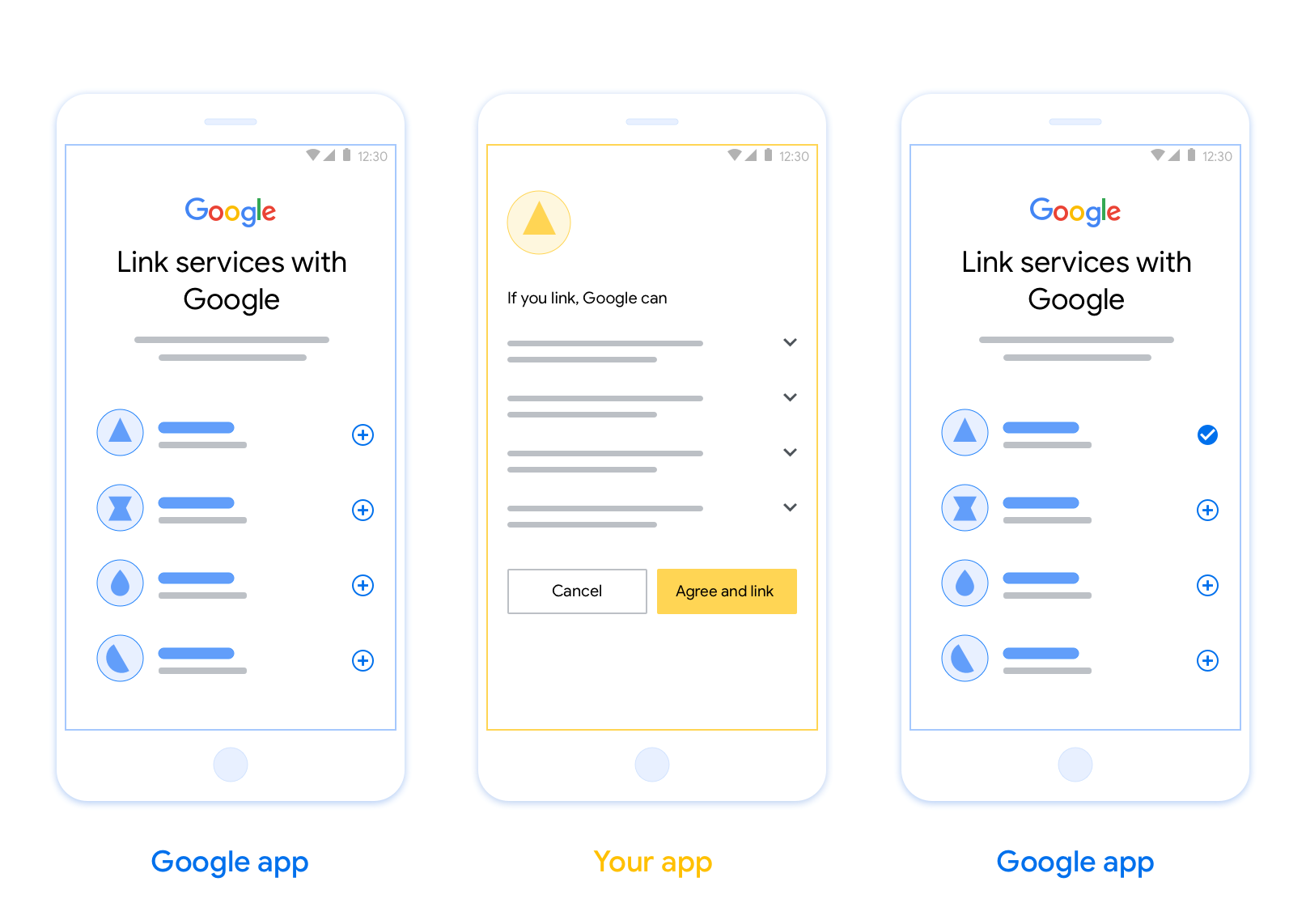
OAuth 型應用程式翻轉連結 (應用程式翻轉) 可讓使用者快速將驗證系統中的帳戶連結至 Google 帳戶。如果使用者在啟動帳戶連結程序時,手機上已安裝您的應用程式,系統會順暢地將他們切換至您的應用程式,以取得使用者授權。
這種做法可加快連結程序,因為使用者不必重新輸入使用者名稱和密碼進行驗證;相反地,應用程式快速連結功能會使用使用者在應用程式帳戶中的憑證。使用者將 Google 帳戶連結至應用程式後,即可使用您開發的任何整合功能。
您可以為 iOS 和 Android 應用程式設定應用程式快速連結。
需求條件
如要導入「應用程式切換」,請務必符合下列規定:
- 您必須擁有 Android 或 iOS 應用程式。
- 您必須擁有、管理及維護支援 OAuth 2.0 授權碼流程的 OAuth 2.0 伺服器。
以 OAuth 為基礎的應用程式切換流程
下方的序列圖詳細說明使用者、Google 應用程式、您的應用程式和您的授權伺服器之間的互動,以進行應用程式快速連結。
角色與職責
下表定義了應用程式切換流程中參與者的角色和職責。
| 執行者 / 元件 | GAL 角色 | 職責 |
|---|---|---|
| Google 應用程式 / 伺服器 | OAuth 用戶端 | 啟動連結程序、觸發行動應用程式的深層連結、將授權碼換成權杖,並安全地儲存權杖,以便存取服務的 API。 |
| 您的應用程式 | 授權代理程式 | 驗證使用者身分 (通常使用現有應用程式憑證)、取得同意聲明,並從伺服器擷取授權碼。 |
| 您的授權伺服器 | 授權伺服器 | 驗證授權碼和更新權杖,並將存取權杖核發給 Google 伺服器。 |
設計指南
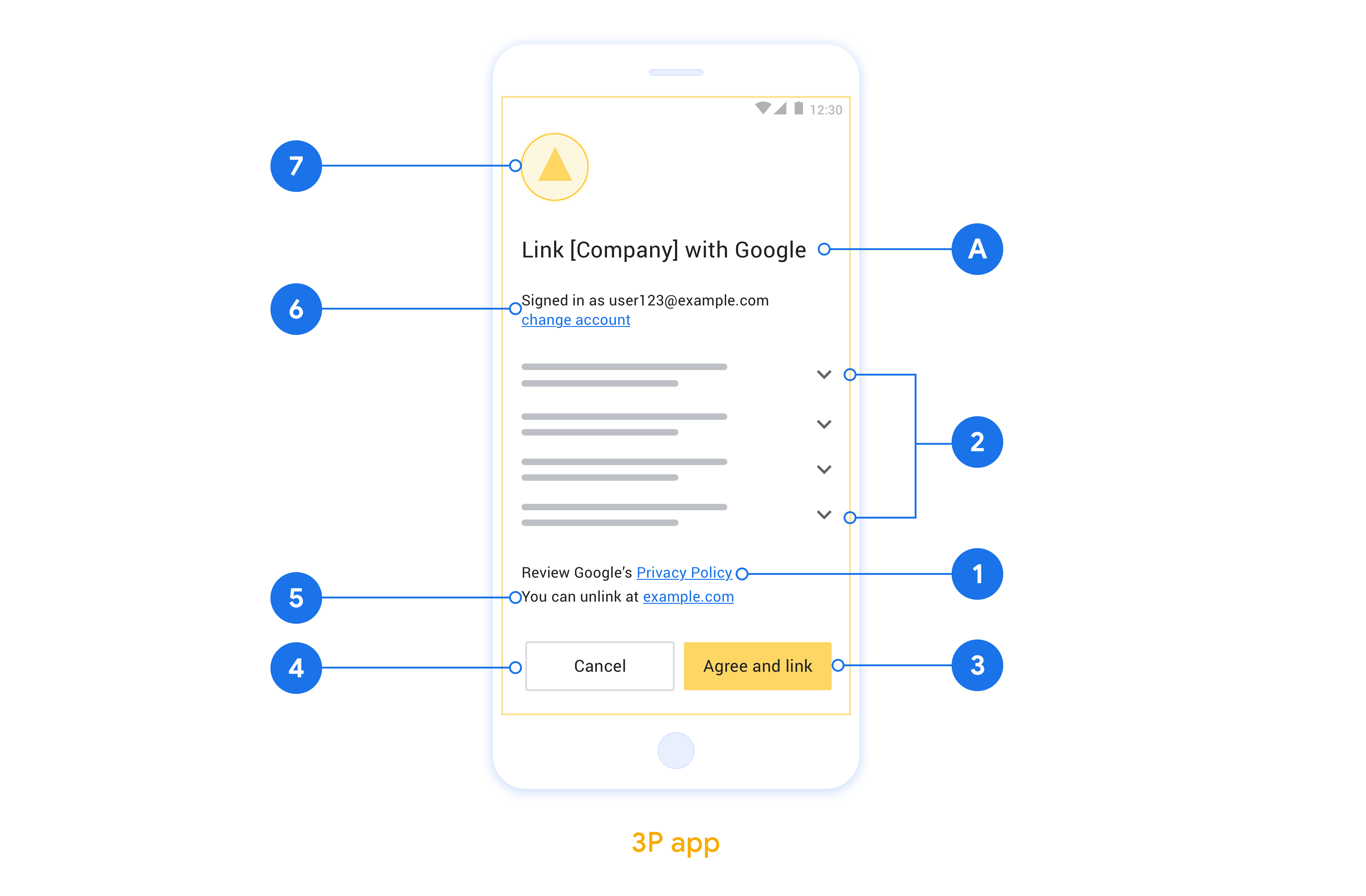
本節說明應用程式切換帳戶連結同意畫面的設計規定和建議。Google 呼叫應用程式後,應用程式會向使用者顯示同意畫面。
需求條件
- 請務必告知使用者,帳戶將連結至 Google,而非 Google Home 或 Google 助理等特定 Google 產品。
建議
建議您採取下列做法:
顯示 Google 隱私權政策。 在同意畫面中加入 Google 隱私權政策的連結。
要分享的資料。請使用簡潔明瞭的用語,告知使用者 Google 需要哪些資料,以及原因。
明確的行動號召。在同意聲明畫面中提供明確的行動號召,例如「同意並連結」。這是因為使用者必須瞭解連結帳戶時,需要與 Google 分享哪些資料。
可拒絕或取消。如果使用者選擇不連結,請提供返回、拒絕或取消的方法。
可取消連結。提供使用者取消連結的機制,例如平台帳戶設定的網址。或者,您也可以加入 Google 帳戶的連結,讓使用者管理已連結的帳戶。
可變更使用者帳戶。建議使用者切換帳戶的方法。如果使用者通常有多個帳戶,這項功能就特別實用。
- 如果使用者必須關閉同意畫面才能切換帳戶,請將可復原的錯誤傳送給 Google,讓使用者透過 OAuth 連結和隱含流程登入所需帳戶。
加入您的標誌。在同意畫面上顯示公司標誌。 請按照樣式指南放置標誌。如要顯示 Google 標誌,請參閱「標誌和商標」一文。
在應用程式中實作 App Flip
如要實作應用程式切換功能,您必須修改應用程式中的使用者授權碼,接受來自 Google 的深層連結。
如要在 Android 應用程式中支援應用程式切換功能,請按照 Android 實作指南中的操作說明進行。
如要在 iOS 應用程式中支援 App Flip,請按照 iOS 實作指南中的說明操作。
測試應用程式快速連結
在通過驗證的正式版應用程式和可用的 OAuth 2.0 伺服器推出前,您可以使用範例和測試應用程式模擬應用程式切換功能。
在應用程式快速連結期間,Google 應用程式會先開啟您的應用程式,然後向 OAuth 2.0 伺服器要求授權碼回應,最後將回應傳回 Google 應用程式。
必要條件
如要模擬 Google 應用程式並觸發啟動應用程式的意圖,請下載並安裝適用於 Android 和 iOS 的應用程式切換測試工具。
下載並安裝 Android 和 iOS 適用的應用程式切換範例,模擬您的應用程式並選取 OAuth 2.0 回應類型。
測試序列
- 開啟應用程式切換測試工具。
- 按下
Try Flip!啟動 App Flip 範例應用程式。 - 在「範例」應用程式中,從圓形按鈕選取回覆。
- 按下
Send,將模擬的 OAuth 2.0 回應傳回測試工具。 - 檢查測試工具記錄訊息,瞭解授權碼或錯誤詳細資料。
正式版測試
完成註冊和 OAuth 2.0 伺服器實作後,即可在正式環境中測試應用程式切換功能。
建議您使用單一 Google 帳戶和工作專用電子郵件地址進行自動化測試。
以 Google 帳戶擁有者身分登入後,即可透過「已連結帳戶」查看帳戶連結狀態。您也可以在這裡取消連結帳戶。
您也可以選擇實作 RISC,以程式輔助方式取消連結並通知 Google 這項變更。